
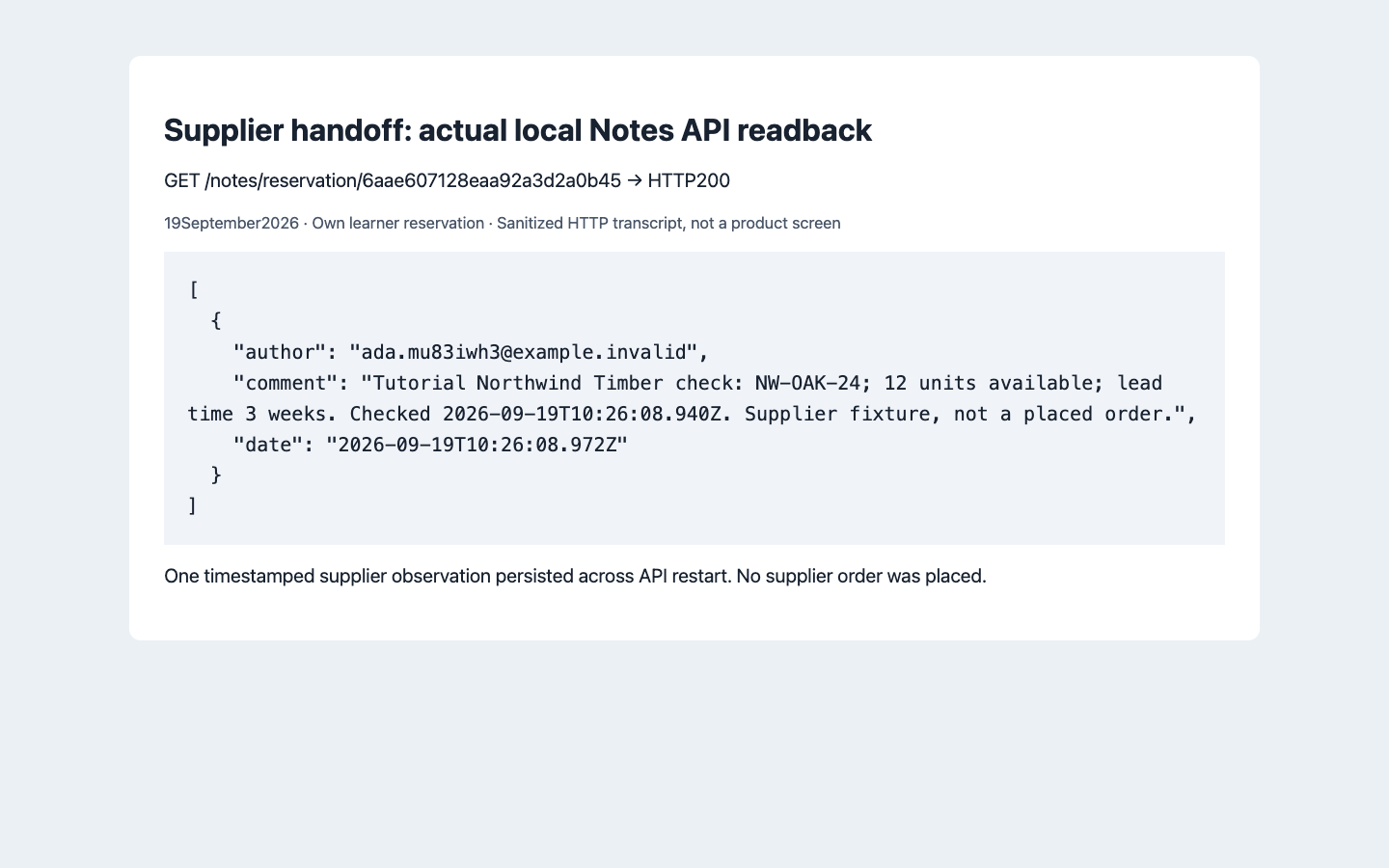
 Northwind's fixture returned 12 units and a three-week lead time. AppEngine retained the timestamped result on the consultation record.
Who: developers connecting an existing business system, with administrators reviewing gateway configuration. Time: 60 minutes. Level: developer integration, then provider extension. Product: AppEngine and Studio Gateway Manager. Checked: 19 September 2026, running local AppEngine 0.132.0 and Studio 0.6.2, using the learner-owned organization and reservation from the connected-client course. Example: Cedar & Form checking Northwind Timber SKU NW-OAK-24 for Lina's consultation.
What you will have at the end
You will inspect the actual provider catalog, call a controlled supplier API, reject bad responses, and save a useful result against an Appmint business record. You will distinguish a registered Gateway Manager provider from a server-side adapter that you own, and understand where email configuration and inbound webhooks fit.
Current build boundary: the checked registry has no generic HTTP/REST provider and no Zapier provider. This course's successful supplier call uses the supplied server-side adapter, followed by AppEngine's supported Notes API. It is not presented as a working arbitrary-HTTP button inside Gateway Manager. The provider-extension section explains how to bring the same contract into the registry when that capability is implemented.
What you need
- Organization ID and staff authentication from Connect a client to AppEngine.
- The training reservation you created in Part 2 of the connected-client course. Reuse its
RESERVATION_ID, yourORG, and your privateSTAFF_TOKEN; do not use the historical author's reservation. The fresh local run used Lina’s booking from that prerequisite. - Node.js with built-in fetch, two terminal windows and an isolated training environment.
- The supplier fixture and the server-side integration example.
The fixture's tutorial-fixture-only header value is deliberately public test data, not a real supplier credential. Replace it with your actual server-held credential when implementing a real integration. Do not put staff credentials or supplier secrets into a downloaded browser bundle.
The story and route
A client is choosing an oak worktop. Staff need a current stock figure and lead time before making a promise. The useful output is a dated note attached to the consultation, not a disconnected JSON response or an unverified green toast.
Your server → supplier availability endpoint → validate status and body
                                             ↓
                    AppEngine Notes API → consultation's saved notes

Future registered provider path:
Your server → AppEngine /upstream/call/<provider>/<operation> → supplier
The saved note is a snapshot. It does not reserve stock, place an order or guarantee the supplier still has that quantity tomorrow.
Part 1 — Understand Gateway Manager's actual controls
1. Open the integration area
In Studio, select Configuration → Integration Config. The page is Gateway Manager, with Configurations, Integration Builder and API Playground.
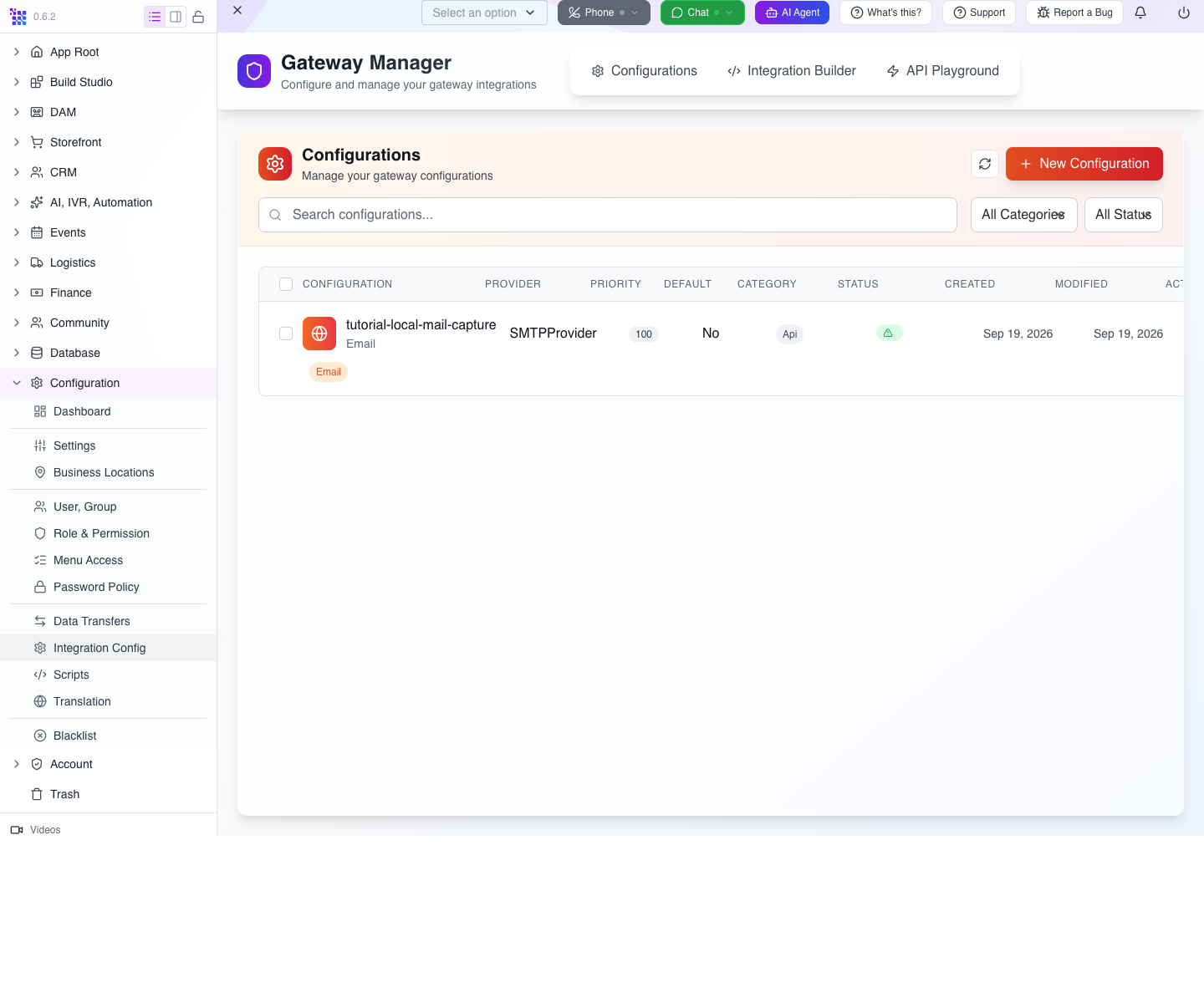
The fresh learner organization already has the loopback mail-capture configuration used for the connected-client prerequisite. It appears in this list; a new empty organization instead shows No Configurations Found. Use New Configuration to start a configuration when needed. A saved configuration is a company’s instance of a provider; it is different from the catalog of implementations.
2. Inspect the catalog rather than inventing a provider name
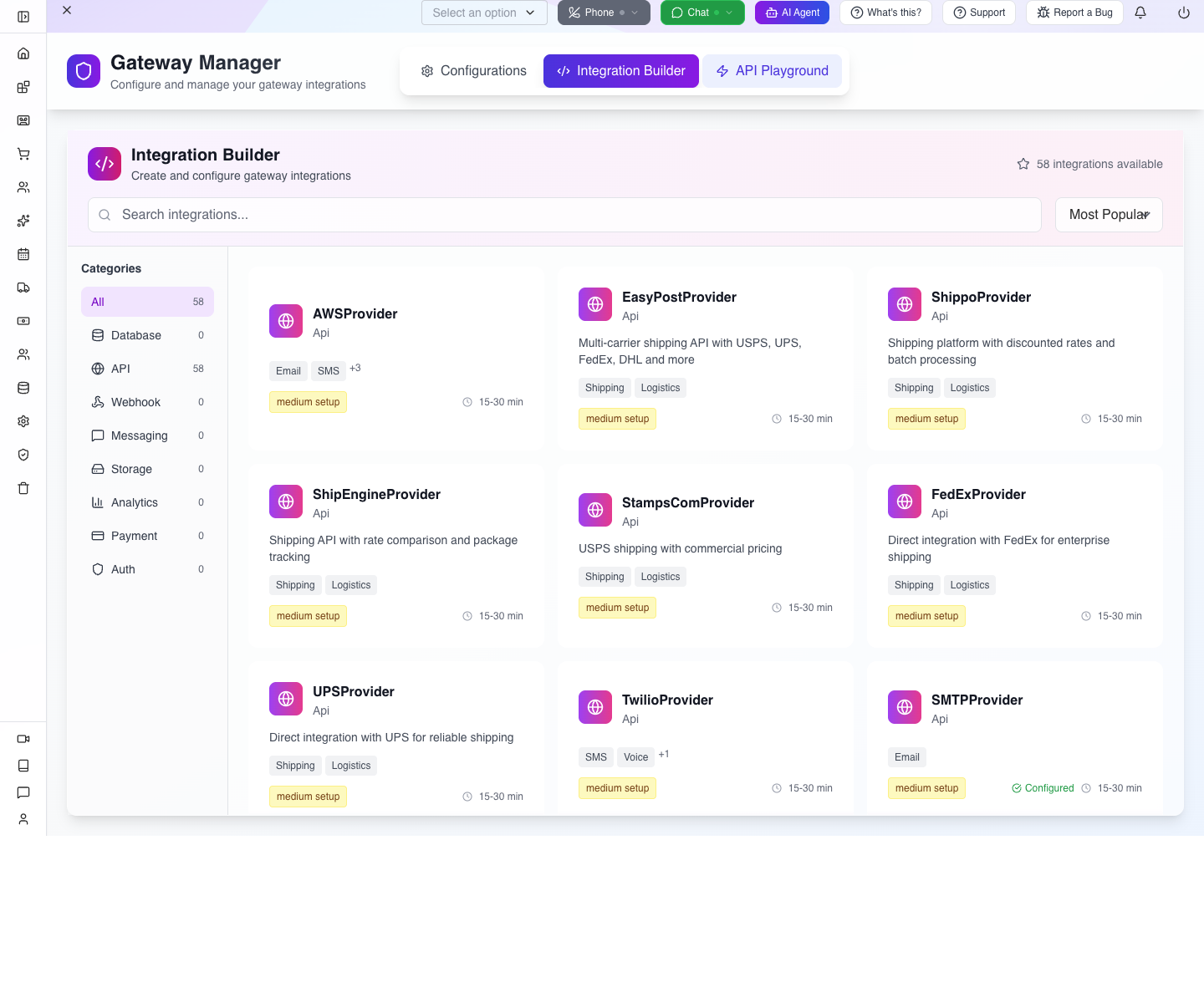
Select Integration Builder. The checked UI counted 58 integrations available, including blank/helper entries that are registry defects, so that number should not be interpreted as 58 proven user journeys.
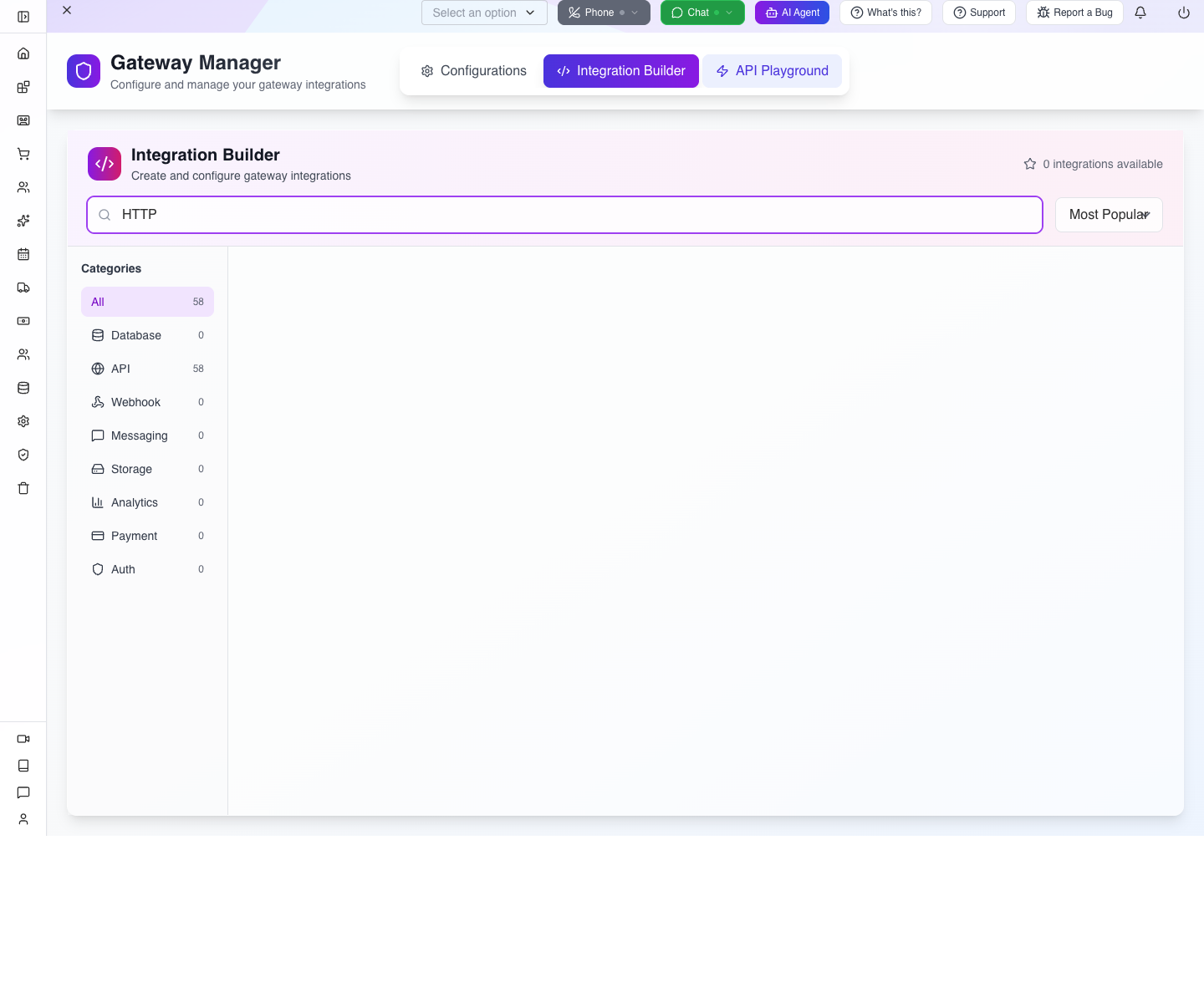
In Search integrations..., enter HTTP. The result showed 0 integrations available.
You can read the same registry with:
curl -sS "$API/upstream/integration-types" \
  -H "orgid: $ORG" -H "Authorization: Bearer $STAFF_TOKEN"
Each usable entry supplies its name, configuration schema and operations. The current list includes providers such as SMTPProvider, MailgunProvider, ResendProvider, SendGridProvider, TwilioProvider, StripeProvider and sales-channel providers. Exact casing matters. It did not include the old topic's proposed generic provider or Zapier fallback.
3. See how a real provider supplies its fields
Clear the search, enter SMTP, then select SMTPProvider. The form includes Name, Type, Use Cases, Priority, Provider, Email, Host, Port, Tls, Secure, Auth → User / Pass, and Send outgoing mail through this server. It has Test, Save and Cancel.
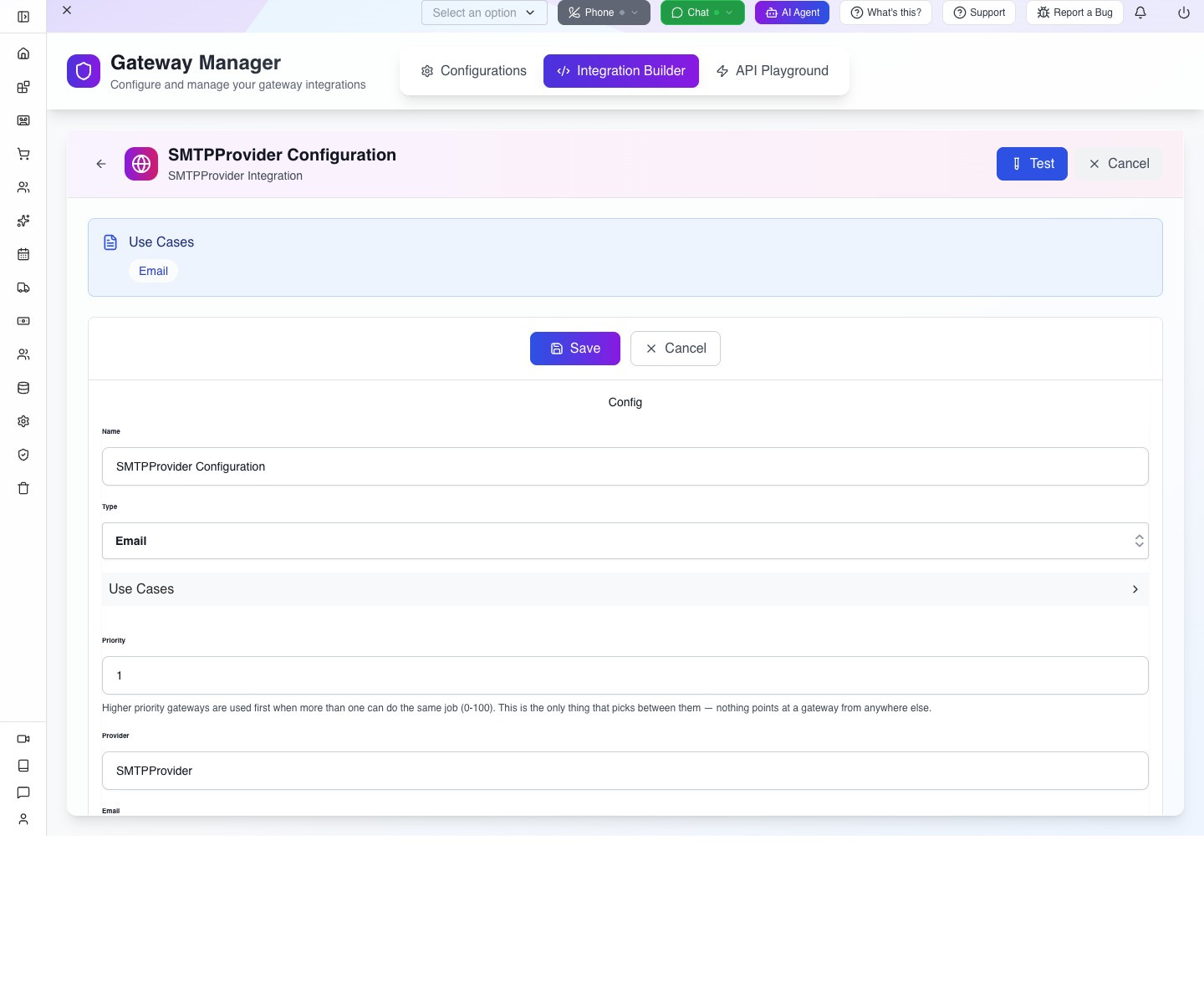
These are SMTP-specific fields. They are not a place to paste an arbitrary supplier REST URL. Inspect this form, then choose Cancel. This step does not save another mail connection or invoke Test; the prerequisite’s local mail catcher remains separate.
The Priority helper says higher-priority eligible gateways are chosen first. Provider transport configuration is separate from CRM → Email Accounts, where business mailbox/sender workflows live. A working transport does not by itself establish which employee should send from which address.
4. Read the Playground's prerequisites
Select API Playground. It offers Auth Method: API Key / Auth Token, Select API Key..., Manage Keys and Available Configurations. The local test-mail configuration appears by name; select it to inspect its sendEmail operation schema without executing the operation.
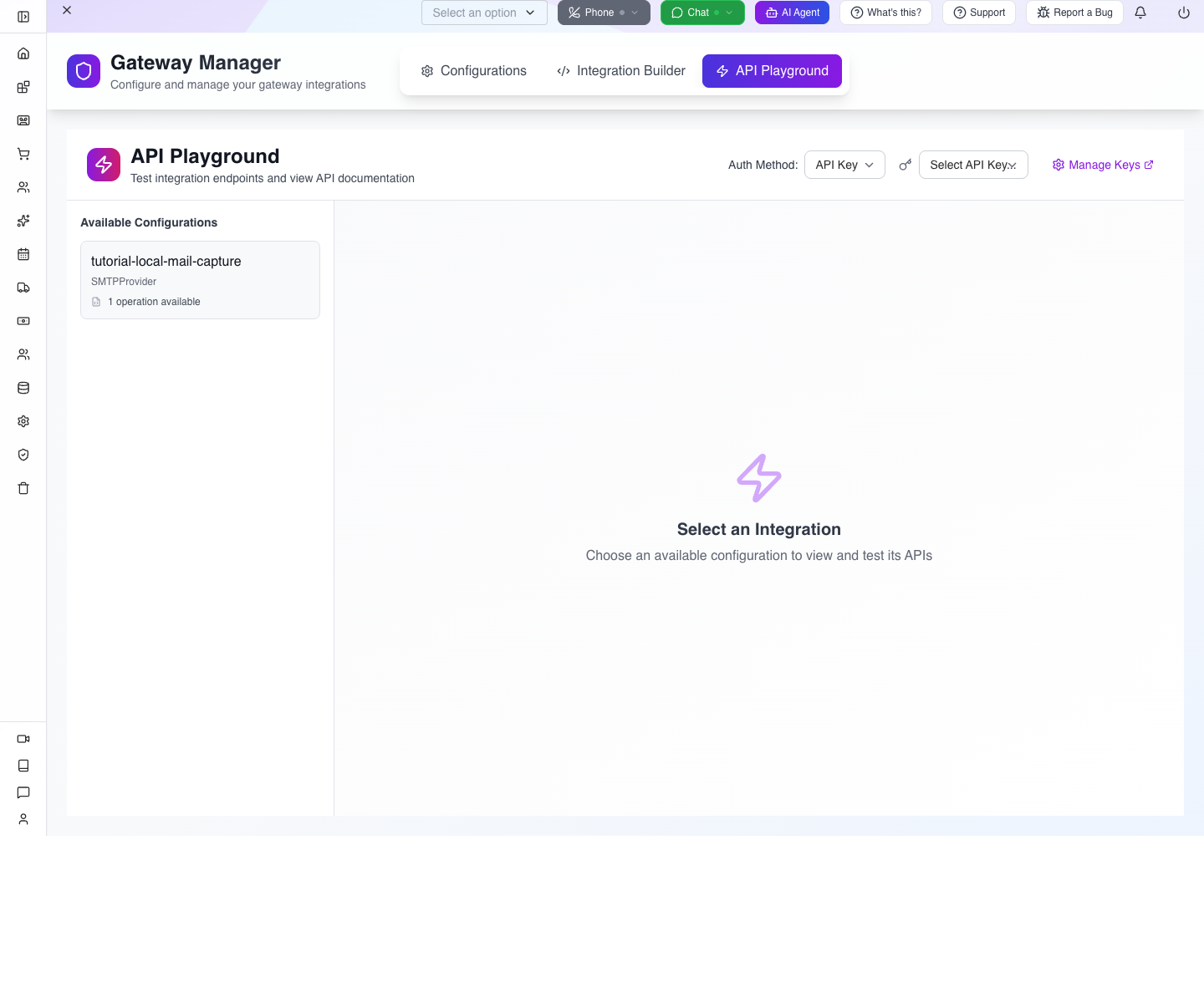
A saved enabled configuration is available here even if the backend has not yet initialized a live instance in its current process. After a restart, the authenticated GET /upstream/active list can be empty until a provider is used. Once the owned SMTP transport was used locally, this endpoint returned 200 with its ID, configuration ID, provider and operation names. It returns metadata, not transport internals or credentials.
The earlier build returned500 when serializing a live SMTP transport and hid saved configurations whose optional status was absent. Both defects were fixed and retested in this local walkthrough. If configuration loading fails, the Playground now displays Unable to load integrations and Retry instead of a false empty state:
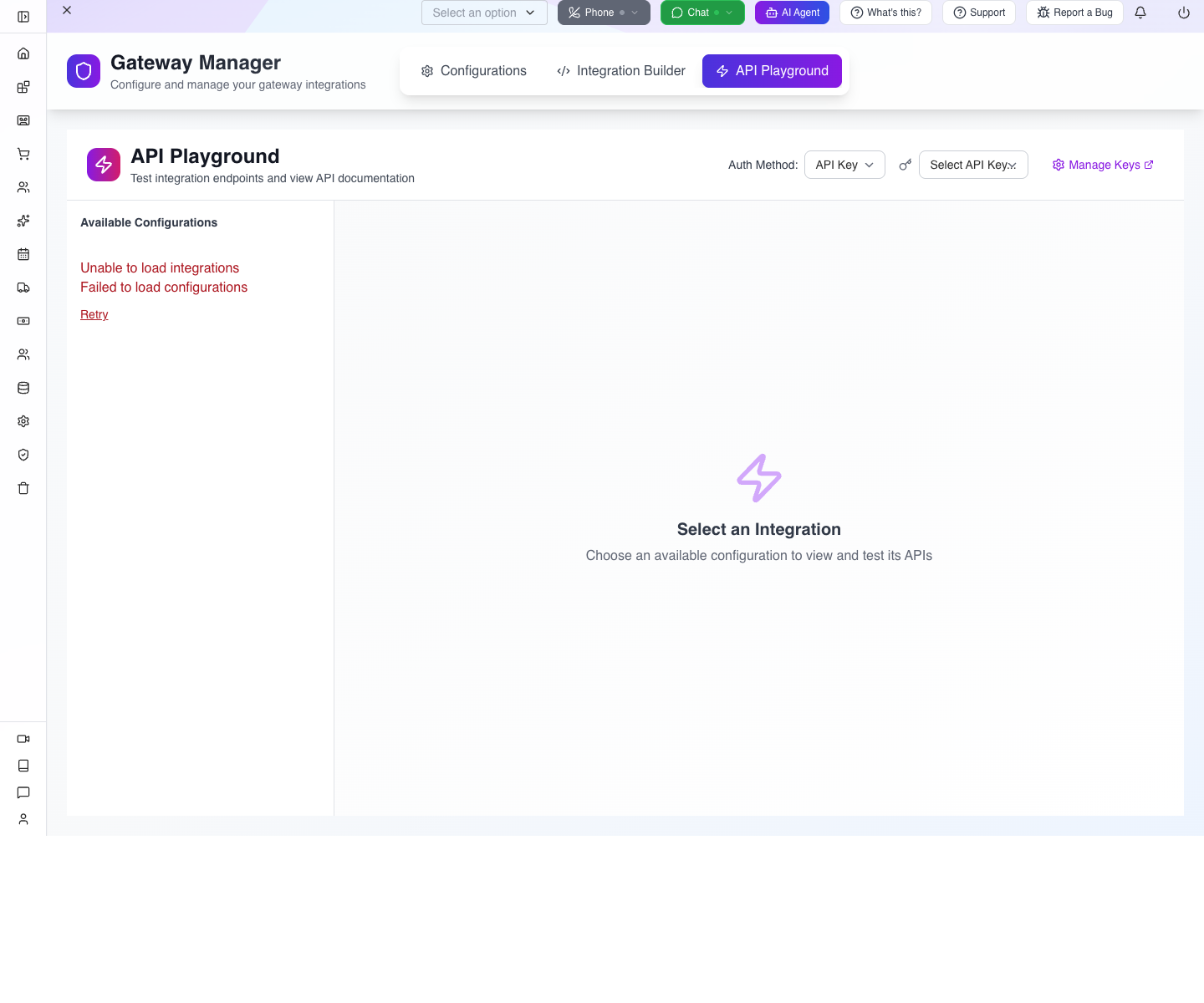
The Playground still cannot execute an unregistered supplier provider. Do not choose a payment or SMS preset merely to test that the interface reacts.
Try it: select a provider relevant to your own business and compare its form fields with its returned schema. Keep credentials private and avoid saving a connection until you know what its test operation does.
Check yourself: does a catalog entry mean your company already has a working connection? No. Implementation, saved configuration, active instance and successful operation are separate checks.
Part 2 — Make a real supplier call with the supplied adapter
1. Start the controlled supplier
Download the fixture into a working directory and run:
node supplier-fixture.mjsIt listens only on your computer's loopback interface, port 4311, and prints a ready message. This address is a developer fixture, not a website link customers should use.
The fixture contract is:
| Request | Result |
|---|---|
GET /availability?sku=NW-OAK-24, correct test header | 200, 12 units, three weeks |
Same route with sku=EMPTY | 200, zero units, three weeks |
Wrong x-supplier-key | 401, invalid training key |
sku=FAIL | 503, temporary supplier failure |
2. Call it directly once
In the second terminal:
curl -sS 'http://127.0.0.1:4311/availability?sku=NW-OAK-24' \
  -H 'x-supplier-key: tutorial-fixture-only'
The actual response was:
{ "sku":"NW-OAK-24", "available":12, "leadTimeWeeks":3 }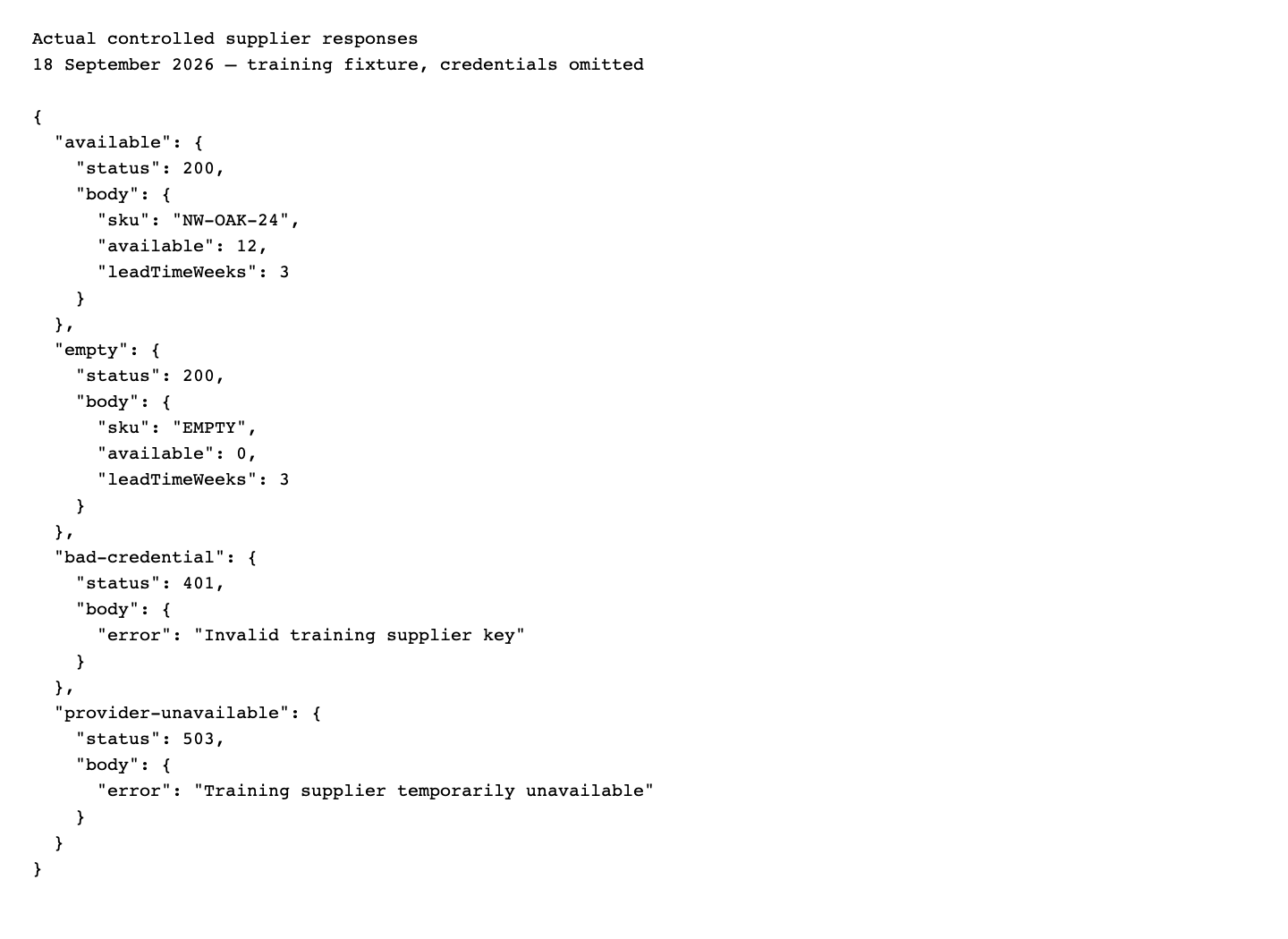
The EMPTY response is successful HTTP with a valid business answer of zero stock. Test numbers explicitly; if (!available) would incorrectly classify zero as a missing value.
3. Configure the server-side example
Supply these environment values privately to check-supplier.mjs:
| Variable | Value |
|---|---|
APPMINT_API | Your AppEngine base URL |
APPMINT_ORG | Your organization ID |
APPMINT_STAFF_TOKEN | Staff bearer from normal sign-in |
SUPPLIER_URL | http://127.0.0.1:4311 for this fixture |
SUPPLIER_KEY | tutorial-fixture-only for this fixture |
RESERVATION_ID | Your own training reservation's sk |
For a real deployment, put credentials in the server's secret configuration. Keep them out of shell recordings, source control and client-side code. The script intentionally refuses to start if a required variable is absent.
4. Run the availability-to-note handoff
node check-supplier.mjs NW-OAK-24The supplied script performs the full sequence:
- Builds the supplier URL with an encoded SKU.
- Applies a five-second request deadline.
- Checks the supplier's HTTP status.
- Requires the requested SKU and nonnegative numeric availability/lead time.
- Adds a timestamp and writes one note to the training reservation.
- Reads the notes back and requires an exact match.
The exact downloadable script was executed successfully in this rehearsal and printed noteVerified: true. It performs one intentional note write per successful invocation; it is not a continuously polling service.
5. Understand the AppEngine write
The business-record handoff uses:
curl -sS -X POST "$API/notes/reservation/$RESERVATION_ID" \
  -H "orgid: $ORG" -H "Authorization: Bearer $STAFF_TOKEN" \
  -H 'Content-Type: application/json' --data '{
    "comment":"Tutorial Northwind Timber check: NW-OAK-24; 12 units available; lead time 3 weeks. Checked <ISO timestamp>. Supplier fixture, not a placed order."
  }'
The checked response was HTTP 201 with author, comment and date. Then:
curl -sS "$API/notes/reservation/$RESERVATION_ID" \
  -H "orgid: $ORG" -H "Authorization: Bearer $STAFF_TOKEN"
returned an array containing the same note. Notes append to the parent record's notes array. This example does not invent a “project” datatype or claim that every Studio screen renders those notes; the demonstrated persistence check is the Notes API.
Try it: run the supplier-only EMPTY request and explain the business answer. Do not promise stock until you have checked the actual supplier again at the decision point.
Check yourself: does the saved note update automatically when supplier stock changes? No. Its timestamp identifies when the snapshot was taken.
Part 3 — Handle errors without writing misleading business data
1. Reject bad credentials before saving
Call the fixture with the wrong test key. It returns 401. Fix the credential source; do not retry the same rejected key in a tight loop.
Keep supplier authentication separate from AppEngine authentication. A supplier 401 concerns the outbound header; an AppEngine 401 concerns the company-side session. Record which host returned the error.
2. Stop on a temporary supplier failure
Run:
node check-supplier.mjs FAILThe exact example exited with code 1 and Supplier HTTP 503: Training supplier temporarily unavailable. It stopped before the AppEngine note write. The earlier successful note remained a dated historical check, not a new claim about current stock.
For a read operation, a bounded retry with backoff can be appropriate. For order placement, a timeout may occur after an order was accepted; reconcile by supplier operation ID before repeating a write. Do not reuse a read-retry policy for purchases.
3. Distinguish malformed data from valid zero stock
The script requires matching SKU and finite nonnegative numbers. To exercise those failures, download the separate fault-only supplier fixture. In another terminal run:
node supplier-fault-fixture.mjsIt listens only on loopback port4312 and deliberately returns unusable replies. Keep the same private AppEngine variables, but override the supplier URL for each failing check:
SUPPLIER_URL=http://127.0.0.1:4312 node check-supplier.mjs MISMATCH
SUPPLIER_URL=http://127.0.0.1:4312 node check-supplier.mjs NEGATIVE
SUPPLIER_URL=http://127.0.0.1:4312 node check-supplier.mjs NONNUMERIC
SUPPLIER_URL=http://127.0.0.1:4312 node check-supplier.mjs MISSING
SUPPLIER_URL=http://127.0.0.1:4312 node check-supplier.mjs BADJSON
SUPPLIER_URL=http://127.0.0.1:4312 node check-supplier.mjs SLOW
The first four exit1 with an unexpected-contract error. BADJSON fails JSON parsing. SLOW exceeds the adapter’s five-second deadline and raises TimeoutError. After each attempt, repeat the Notes GET from Part 2.5: the previous successful note must remain unchanged and no new note should appear. These are deliberately faulty test-server responses, not simulated AppEngine writes. All six were exercised against the actual adapter and persisted local reservation.
Stop the fault fixture with Ctrl+C when finished. Extend the validated contract to the actual supplier's documented units, currency, stock location and lead-time meaning. For example, three calendar weeks and fifteen working days are not interchangeable promises.
If validation fails, stop before writing a new result. An HTTP 200 with an error object or a missing field is not a usable availability answer.
4. Diagnose the gateway boundary separately
The following request to the absent provider returned404 on the running local API:
curl -sS -X POST "$API/upstream/call/TutorialNorthwindProvider/availability" \
  -H "orgid: $ORG" -H "Authorization: Bearer $STAFF_TOKEN" \
  -H 'Content-Type: application/json' --data '{"data":{"sku":"NW-OAK-24"}}'
Omitting orgid from discovery returned 400 missing_orgid; omitting authentication returned 401 missing_authorization_header.
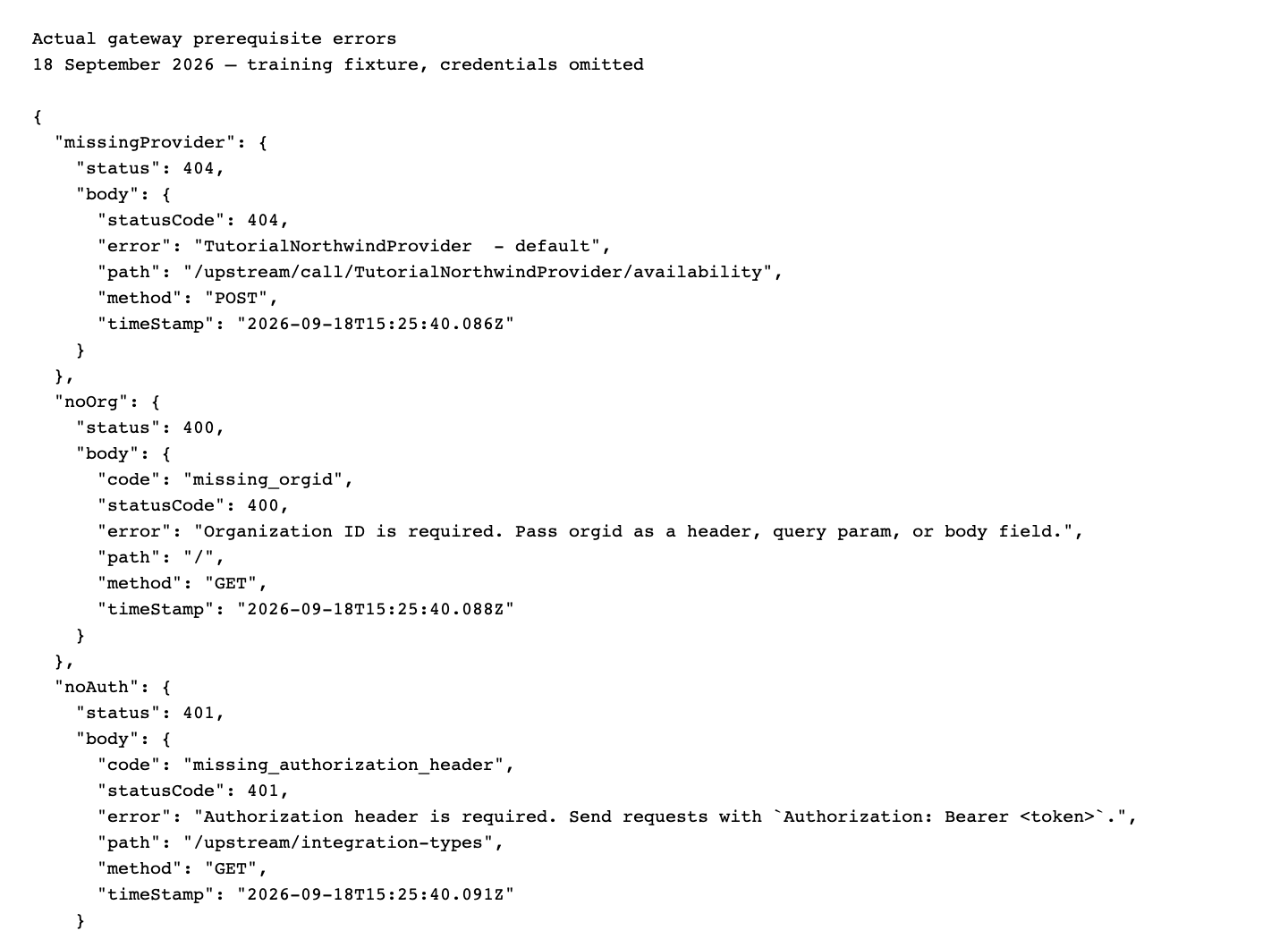
Changing the display name of a saved configuration cannot install a missing implementation. Use the tested adapter path until the provider is available.
Try it: compare success, zero stock, supplier 401, supplier 503 and AppEngine missing-provider responses. Decide which, if any, can produce a new business note.
Check yourself: should a failed fresh check erase the timestamp on an older successful check? No. Preserve the old observation and identify the new failure separately.
Part 4 — Optional maintainer extension: bring the adapter into the registry
The supplier-call-and-note walkthrough is complete after Part 3. The following is a separate maintainer implementation project; it is not required to run the supplied adapter and was not deployed during this course.
- Add a provider class extending
IntegrationProviderin AppEngine's integrations source. Its configuration schema should define the supplier base URL and server-held authentication fields; credentials should use password-style form fields. - Implement
init,doOperation,shutdown,testandpostSave. Declare only supported operations, for exampleavailabilityand a read-only connection test. Reuse the validated request/response contract from the supplied example. - Export the class from
src/integrations/index.ts. The registry loads exports at startup; a local file that is never exported will not appear in discovery. - Build and test in an isolated environment. Verify 12 units, zero units, invalid credentials, upstream 503, timeout and malformed payload. Confirm that failure cannot write a successful availability note.
- Read
/upstream/integration-types/<ExactClassName>from the deployed test build. Confirm the schema and operation names before documenting them as UI steps. - Save a configuration through the generated form, reload it, execute the read-only operation and compare its output with the direct fixture. Only then replace the adapter path in this course with a demonstrated gateway path.
The current provider ID convention is <ClassName>-<configuration name>. POST /upstream/save-integration expects a configuration record envelope with data.provider and provider-specific fields, not the old speculative {provider,name,config} body. Use the current generated form or a verified envelope from your deployed implementation.
The gateway is server-side, but the configuration UI necessarily handles entered credentials. Do not claim credentials were never in an administrator's browser; the important boundary is that they are not shipped to the customer-facing app.
Email and inbound webhooks
Email transport providers are existing integrations, while employee/customer mailbox workflows are separate configuration. Test transport with an address you control, then test the intended sender identity and delivery result. The connected-client prerequisite used a loopback-only mail catcher. This supplier handoff does not send an external email or require new email credentials.
The generic connect route is /connect/webhook/:vendor/:serviceId?. The controller accepts organization context from orgid header or query. The optional path segment is serviceId, not a guaranteed organization slot. The middleware's no-header fallback is inconsistent with the old topic's proposed URL. Do not hand a supplier an invented /connect/webhook/northwind/<org> address and assume it works.
A custom inbound integration needs a real vendor handler, verified signature handling, replay/idempotency rules, organization resolution and a controlled delivery test. A public route declaration alone does not make it a safe catch-all webhook receiver.
Automate only after the contract works
Use background jobs or business automation after a single availability check and note readback work reliably. Add a freshness rule and duplicate-write policy before scheduling repeated checks. This Notes API is append-only: repeating a successful script adds another note.
If something goes wrong
| Symptom | First check | Next action |
|---|---|---|
| No HTTP provider | Running catalog | Use the tested server adapter; do not invent a provider name. |
| Catalog count includes blank entries | Entry schema and name | Treat as registry defects, not working integrations. |
| No available configurations | Saved provider and explicit status | A saved provider with no status is enabled; explicitly inactive/error/testing entries are excluded. Use Retry for a load error. |
| Active endpoint returns500 | Running backend version | The repaired local endpoint returns safe metadata; update/retest the affected build. |
| Wrong supplier key | Outbound credential | Correct it; no business write on 401. |
| Zero available | Valid response body | Report out of stock; zero is a valid number. |
| Supplier 503 | Supplier availability | Stop the write, preserve old timestamp, retry reads deliberately. |
| Note appears twice | Script invoked twice | Add an operation/check identifier before automation. |
| Gateway provider 404 | Exact registered class/instance | Install and verify implementation before configuring it. |
| Webhook goes to the wrong company | Header/query and vendor handler | Test explicit organization resolution; do not guess path semantics. |
| Transport works but sender is wrong | CRM Email Accounts | Configure the business sender workflow separately. |
What happened behind the scenes
Source and evidence
Gateway UI: websitemint/packages/ui/src/components/configuration/gateway/ contains builder, list, playground and store. AppEngine's upstream.controller.ts, upstream.service.ts and upstream.register.ts own discovery, configuration envelopes, in-memory active instances and dispatch. integrations/integration.provider.ts defines the extension contract. notes/notes.controller.ts and notes.service.ts implement the append/read handoff. connect/connect.controller.ts and the current-user middleware explain the webhook organization mismatch.
Evidence: supplier and Notes API rehearsal, exact example execution, provider discovery, active-list error, capture ledger. The fixture and adapter source are linked in prerequisites.
Where next
Operate and extend AppEngine covers request tracing and release checks. Background jobs covers the difference between a schedule, queued work and a persisted result.
Historical evidence, 18 September: Gateway tabs, catalog, HTTP search, SMTP form and Playground inspected live; loopback supplier success/zero/401/503 exercised; supported note append/readback completed; exact downloadable adapter tested for success and 503; missing-provider and auth errors verified. No native generic-HTTP configuration, SMTP save/send, external supplier order, inbound webhook delivery or provider deployment is claimed. Video production guide.
Fresh learner verification, 19 September 2026: authenticated Gateway tabs/catalog/HTTP search/SMTP form/Playground inspected with the learner’s own staff account. Exact downloadable supplier fixture and adapter completed one note append/readback on the prerequisite reservation. Zero stock,401,503, missing configuration, mismatched SKU, negative/string/missing numeric fields, malformed JSON and timeout were exercised; failing adapter runs left the saved note unchanged. The note survived a local API restart. /upstream/active serialization and Playground configuration/error handling were repaired, regression-tested, rebuilt and verified against the actual local API/UI. Walkthrough and application-fix report. No generic-provider implementation/deployment, external supplier order, production call or inbound webhook delivery is claimed.