
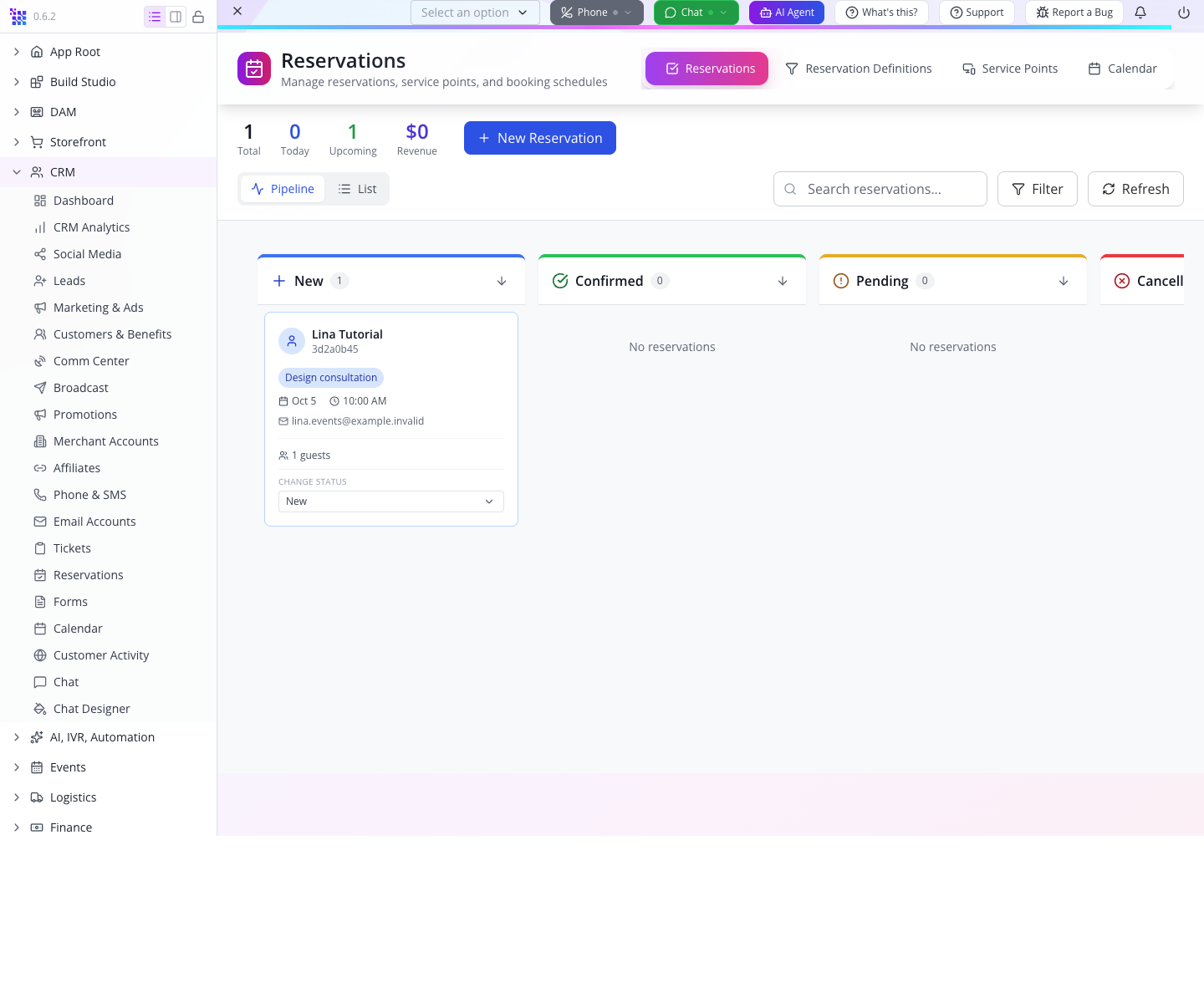
 Lina's consultation was created through HTTP, then opened in Studio Manager. Both interfaces use the same saved record.
Who: developers comfortable with basic JavaScript and JSON. Time: 60–90 minutes. Level: first integration, followed by deployment and access-control work. Product: AppEngine and Studio Manager. Checked: 19 September 2026; local AppEngine 0.132.0 and Studio 0.6.2, with newly created controlled customer accounts. Earlier 18 September captures are labelled historical below. Example: Cedar & Form's consultation workflow, rehearsed with the separate fictional accounts Lina Tutorial and Kofi.
What you will have at the end
You will sign a customer in, read their profile and reservations, create a consultation, and find it on the staff board. You will understand the response envelopes, the organization header, the difference between customer and staff credentials, and the second customer header used by a server acting on a customer's behalf.
You will also have a concrete acceptance test for your integration. On the checked local build, profile edits persist, Lina can read her reservation, and Kofi cannot read it through either the customer route or generic repository route. Test these same boundaries in your deployment. The historical duplicate-booking behavior still calls for reconciliation and server-side idempotency before automated retries.
What you need
- Your organization ID from Appmint signup and first setup. This is the company's identifier, supplied as
orgid. - Two controlled customer accounts with known passwords in this organization. Part 1.2 now creates Lina and Kofi through the supported customer-signup API; an organization-configured EventOxygen build is not required. The
.invalidaddresses below cannot receive external email. - An isolated local training organization with outgoing email routed to a local test inbox before signup or booking. These operations can create welcome messages, owner copies and reminder schedules. The local rehearsal used an organization-owned SMTP integration pointed at a loopback catcher; no external mail provider was used for customer signup or booking.
- A staff account for configuring the service and reading back the booking. Customers use their own customer session; they do not receive this staff credential.
- Node.js with
fetch, or curl and a JSON viewer. You can complete the exercise in a terminal before connecting your own web or mobile interface. - A free reservation definition. Part 2 includes the exact definition used in this rehearsal. For the business setup behind it, see Enquiries, leads and consultations.
Choose one environment. The checked production API is https://appengine.appmint.io. Its /health returned 200. The alternative api.appmint.io did not resolve during this check. The local rehearsal used an operator-configured development server; use the base address your operator provides. A local account and a production account are not interchangeable.
The story and route
Cedar & Form wants its own client experience while keeping bookings in Appmint. Lina books a design conversation from that client; staff work from CRM → Reservations as usual. Kofi is a second test customer used to check ownership.
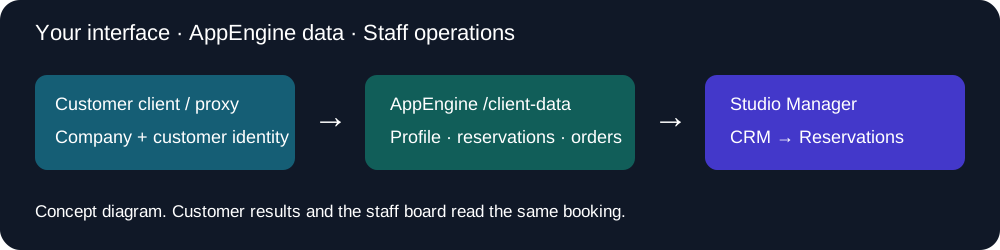
There are three distinct identities to keep straight:
| Value | Meaning | Where it belongs |
|---|---|---|
orgid | Which company the request addresses | Every business request |
| Customer bearer | Which customer is signed in | Customer API calls |
Staff/application bearer plus x-client-authorization | A trusted server acting for a particular customer | Your server-side integration |
An organization ID is an identifier, not a password. A staff API key or application secret is a credential. Keep the latter on the server.
Part 1 — Read real customer data
1. Check the API before debugging credentials
Set your base address and company ID in the shell. Replace the organization placeholder; do not copy the training company's ID into your own integration.
API='http://localhost:3300' # The operator-configured local API used in this lab.
ORG='<your-organization-id>'
curl -sS "$API/health"
curl -sS "$API/profile/whoami"
You should see: health JSON containing isHealthy, service states and a version. whoami returned the plain text Anonymous User in this rehearsal, even when called with the customer bearer. Read it as text; do not use this public response as your customer-session check.
If the host cannot be resolved, fix the API address before changing the password or organization ID. A DNS error occurs before customer authentication.
2. Create both customer accounts, then sign in
Use the same API and ORG as your staff account. For a first run, create Lina Tutorial through POST /profile/customer/signup:
curl -sS -X POST "$API/profile/customer/signup" \
  -H "orgid: $ORG" -H 'Content-Type: application/json' \
  --data '{"firstName":"Lina","lastName":"Tutorial","email":"[email protected]","password":"<new-private-customer-password>"}'
Use a fresh private password, not the literal placeholder. Repeat with firstName: "Kofi", email [email protected] and a different private password. The checked local response was 201 with customer, token and refreshToken; customer.sk is each new account's ID. No inbox verification was required by this local signup flow. Its welcome messages arrived in the local test inbox. Keep the full responses private.
If an account already exists, sign in using its known password instead of registering it again. An existing-account error does not give you control of that identity. Use another controlled training address if you do not own it, and use that address consistently in the booking and ownership checks.
Use POST /profile/customer/signin with the company header and the customer's email/password. The password is private; the example deliberately uses a placeholder.
curl -sS -X POST "$API/profile/customer/signin" \
  -H "orgid: $ORG" -H 'Content-Type: application/json' \
  --data '{"email":"[email protected]","password":"<customer-password>"}'
The successful response contains token and refreshToken. Keep them in your session implementation or private terminal variables. Do not paste the response into a support ticket or public capture.
A wrong password returned HTTP 400 with error: "bad password"; do not write a client that recognizes authentication failure only when the status is 401. If a sign-in response requires a password change or another challenge, complete that flow before treating it as a usable session.
3. Read the profile and unwrap the record
With the returned access value in CUSTOMER_TOKEN, call:
curl -sS "$API/client-data/profile" \
  -H "orgid: $ORG" -H "Authorization: Bearer $CUSTOMER_TOKEN"
The profile is a record envelope. Read the person's name from response.data.firstName, not response.firstName. Its sk identifies the saved customer; data holds the business fields.
4. Read lists without mistaking the envelope for an array
curl -sS "$API/client-data/reservations" \
  -H "orgid: $ORG" -H "Authorization: Bearer $CUSTOMER_TOKEN"
curl -sS "$API/client-data/orders" \
  -H "orgid: $ORG" -H "Authorization: Bearer $CUSTOMER_TOKEN"
Both returned objects containing total, pagination fields and a data array. An empty account returned total: 0, data: [], not a bare []. Each list item is itself a record, so a booking's service is response.data[0].data.service.
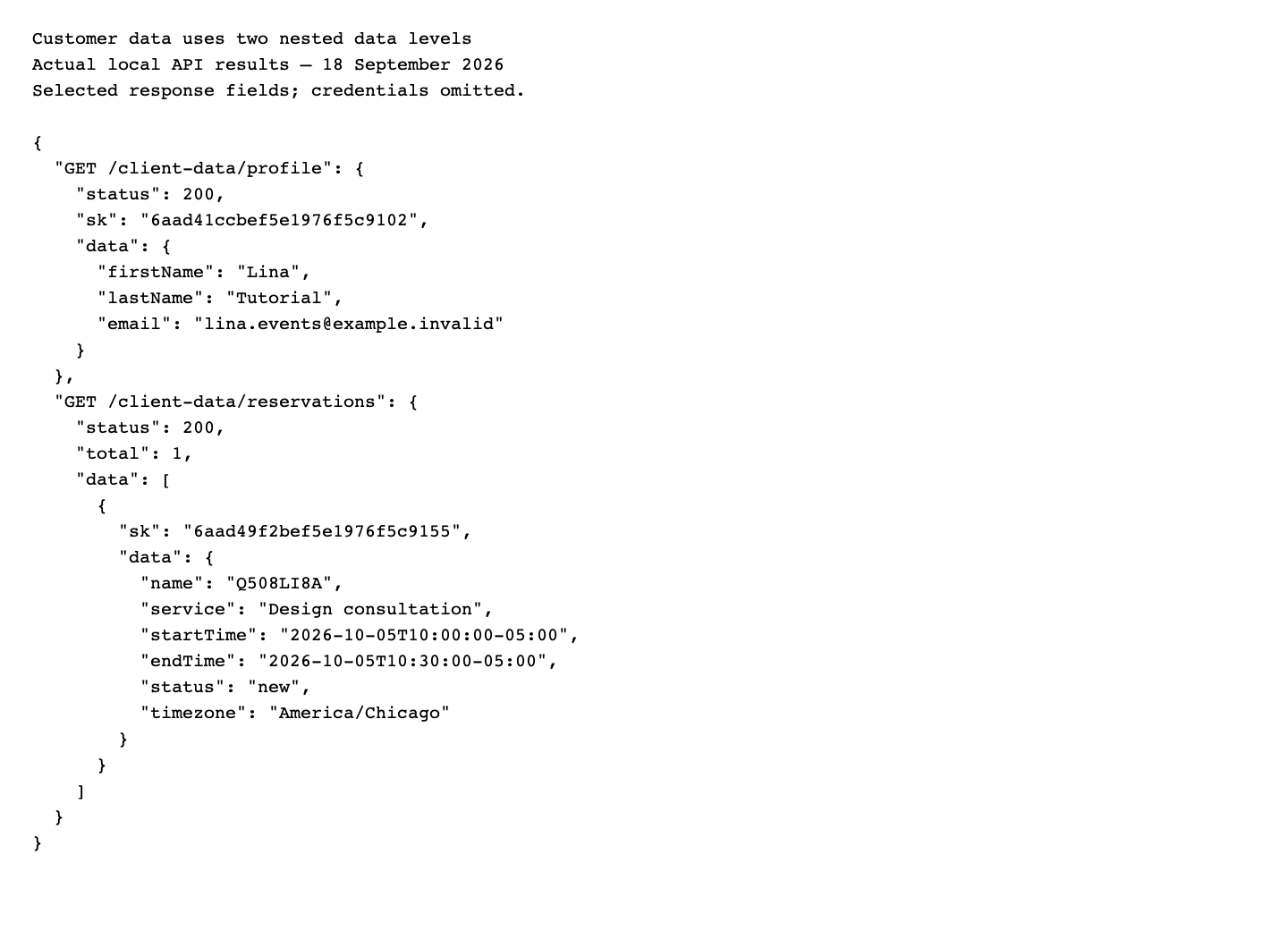 This is a transcript of real HTTP results, not a mock application screen. Notice the profile's
 data object and the reservation list's data array.
5. Read the dashboard, then check what its counters mean
Call GET /client-data/dashboard with the same headers. It returned profile, summary, recentOrders, payment information, analytics, addresses, benefits and affiliate information.
After Lina booked, the reservations list contained her appointment but summary.upcomingReservations remained 0. This counter currently selects the literal reservation status upcoming; the create endpoint saved new. Studio's board still displayed an upcoming appointment by date.
For a booking view, render the returned reservation list and its actual date/status. Do not hide a valid booking because this aggregate counter is zero. Similarly, nextReservation was omitted when the aggregate found no matching status; handle an absent field as well as null.
Try it: sign in as your second controlled customer in the same API and ORG, keeping the first customer’s bearer in CUSTOMER_TOKEN and the second customer’s bearer in a separate SECOND_CUSTOMER_TOKEN variable. Compare profile.data.email and the reservations envelope; do not overwrite the first customer’s token. Part 4 uses both identities.
Check yourself: a list has total: 1 and your UI says “No bookings.” Check whether you tested response.length instead of response.data.length.
Part 2 — Create the service and book one consultation
1. Establish the reservation definition as staff
A booking needs a real reservation definition and an offered service. The old shortcut of posting only a date and time is insufficient on this build.
For the API exercise, sign in with your staff account, using the same API origin and ORG as Part 1:
curl -sS -X POST "$API/profile/user/signin" \
  -H "orgid: $ORG" -H 'Content-Type: application/json' \
  --data '{"email":"<your-staff-email>","password":"<your-staff-password>"}'
Replace both placeholders privately; do not publish the completed command or response. A completed sign-in returns token; retain that JWT as STAFF_TOKEN, separately from CUSTOMER_TOKEN. If the response asks for verification or a password change, it is not a completed sign-in: complete your account’s supported verification/recovery flow before this lab. Do not copy a challenge token into STAFF_TOKEN.
Check the completed sign-in response before creating anything: user.datatype must be user, user.data.email must match your staff email, and the returned orgId must match ORG. Keep the bearer returned by that same response. Then confirm that the protected definition lookup below succeeds.
GET /profile/whoami returned Anonymous User even with a valid staff bearer on this local build. It is not a usable staff-session gate here; do not abandon a successful protected sign-in because of that public diagnostic response.
First run or returning learner: look up the definition before creating it. Reuse API, ORG and STAFF_TOKEN from above. This is a read-only GET; there is no request body:
curl -sS --write-out '\nHTTP %{http_code}\n' \
  "$API/repository/find-by-attribute/reservation_definition/data.name/tutorial-api-consultation?p=1&ps=2" \
  -H "orgid: $ORG" -H "Authorization: Bearer $STAFF_TOKEN"
The response should be HTTP 200 with a list envelope: total and data, where each element has its own sk and nested data. The filter searches the definition’s data.name; it does not search reservation references or service titles.
total: 0and an emptydataarray: no matching definition was found. Continue with the create request below.- Exactly one match: inspect
data[0].data. Reuse it only if it is the intended training definition: nametutorial-api-consultation, typeservice, statusactive, and serviceDesign consultationwith duration 30 and price 0. Check its hours, timezone and venue against the example before booking. Put the record’sdata[0].sk, not its name, intoDEFINITION_ID, then skip the create request. - More than one match, different settings, or an unexpected response: stop and have the staff operator identify the intended definition in Reservation Definitions. Do not pick the first row or create another to work around an ambiguous result.
ps=2limits the returned rows, whiletotalreports the matching count. A 401/403 or failed request does not mean the definition is absent.
For the reuse branch, retain and read the selected ID once more:
DEFINITION_ID='<sk-from-the-single-matching-definition>'
curl -sS --write-out '\nHTTP %{http_code}\n' \
  "$API/repository/get/reservation_definition/$DEFINITION_ID" \
  -H "orgid: $ORG" -H "Authorization: Bearer $STAFF_TOKEN"
Expect HTTP 200 and a single record whose sk equals DEFINITION_ID and whose data contains the definition just reviewed. This lookup uses an authenticated staff session with repository read permission. Keep the same environment and organization throughout.
Only when the lookup returned zero matches, create this free training definition:
curl -sS -X PUT "$API/repository/create" \
  -H "orgid: $ORG" -H "Authorization: Bearer $STAFF_TOKEN" \
  -H 'Content-Type: application/json' --data '{
    "datatype":"reservation_definition",
    "isNew":true,
    "data":{
      "name":"tutorial-api-consultation",
      "title":"Tutorial API design consultation",
      "type":"service", "status":"active",
      "services":[{
        "name":"Design consultation", "duration":30,
        "price":0, "breakAfter":0
      }],
      "officeDays":["Monday","Tuesday","Wednesday","Thursday","Friday"],
      "officeHours":{
        "timezone":"America/Chicago",
        "startTime":"09:00", "endTime":"17:00"
      },
      "spots":1,
      "venueData":{
        "type":"physical", "name":"Tutorial design room",
        "address":"Training venue"
      },
      "notificationTemplate":[]
    }
  }'
You should see: HTTP 200 and the definition record. Save its sk as DEFINITION_ID. Returning learners who reused the matching definition above already have this value and should not repeat the create request.
This example uses PUT. Both PUT and POST creation routes are now registered and verified locally. If you see the historical POST404 error on an older build, use this PUT example and report the installed version.
In Studio, open CRM → Reservations → Reservation Definitions to review the service. The UI course explains office hours, blocked time, venue information and the business's notification choices. An empty notification-template list is not a general promise that booking has no notification side effects; the service also creates default reminder schedules. Use controlled training contacts.
2. Send a complete booking as the customer
Switch back to the customer bearer. Save the following JSON as reservation.json, replacing the definition ID with your returned value and selecting a future available date for a fresh rehearsal.
{
  "reservationDefinitionId": "<definition-sk>",
  "service": "Design consultation",
  "startTime": "2026-10-05T10:00:00-05:00",
  "endTime": "2026-10-05T10:30:00-05:00",
  "customer": {
    "email": "[email protected]",
    "name": "Lina Tutorial"
  },
  "partySize": 1
}
The offset is explicit. For this October date, 10:00 in Chicago is -05:00; do not use the same fixed offset for every date of the year. Your application should calculate the offset from the appointment date and business timezone.
curl -sS -X POST "$API/client-data/reservations" \
  -H "orgid: $ORG" -H "Authorization: Bearer $CUSTOMER_TOKEN" \
  -H 'Content-Type: application/json' --data-binary @reservation.json
You should see: HTTP 201 and a reservation with its own sk, generated reference and data.status: "new". The fresh local booking has reference HJTLSSU4 in data.name; Studio displays the final eight characters of its record ID, 3d2a0b45, on the card. Your generated values will differ. Its saved customer ID matched Lina, and the saved timezone was America/Chicago.
Retain this new record’s sk as RESERVATION_ID for the read-only ownership test in Part 4. This is the reservation ID, not DEFINITION_ID, the customer ID, or the short booking reference:
RESERVATION_ID='<sk-from-your-successful-reservation-response>'3. Read the saved booking from the customer's list
Repeat GET /client-data/reservations. Find the returned reservation by sk; compare service, start/end, customer and status with the request.
The repaired single-record route also works on the checked local build:
curl -sS --write-out '\nHTTP %{http_code}\n' \
  "$API/client-data/reservations/$RESERVATION_ID" \
  -H "orgid: $ORG" -H "Authorization: Bearer $CUSTOMER_TOKEN"
Expect 200 and the reservation record, not a list envelope. Kofi's token requesting this same ID returns 404. The customer's filtered list remains useful for listing bookings; neither path needs a staff credential in the browser.
4. Open the same booking as staff
In Studio, open CRM → Reservations. On the Reservations tab, use the Pipeline view. The New column contains Lina's card with Design consultation, Oct 5, 10:00 AM and her email.
Reload and locate it again. The board's CHANGE STATUS control offers New, Confirmed, Pending, Cancelled and Completed. Booking creation did not automatically confirm the appointment; leave it New for this exercise.
5. Handle uncertain outcomes without blind resubmission
In the historical 18 September run, a repeated identical booking POST created a second record, R88D6C8W, with a different sk. It did not return the first record or reject the occupied time in this test.
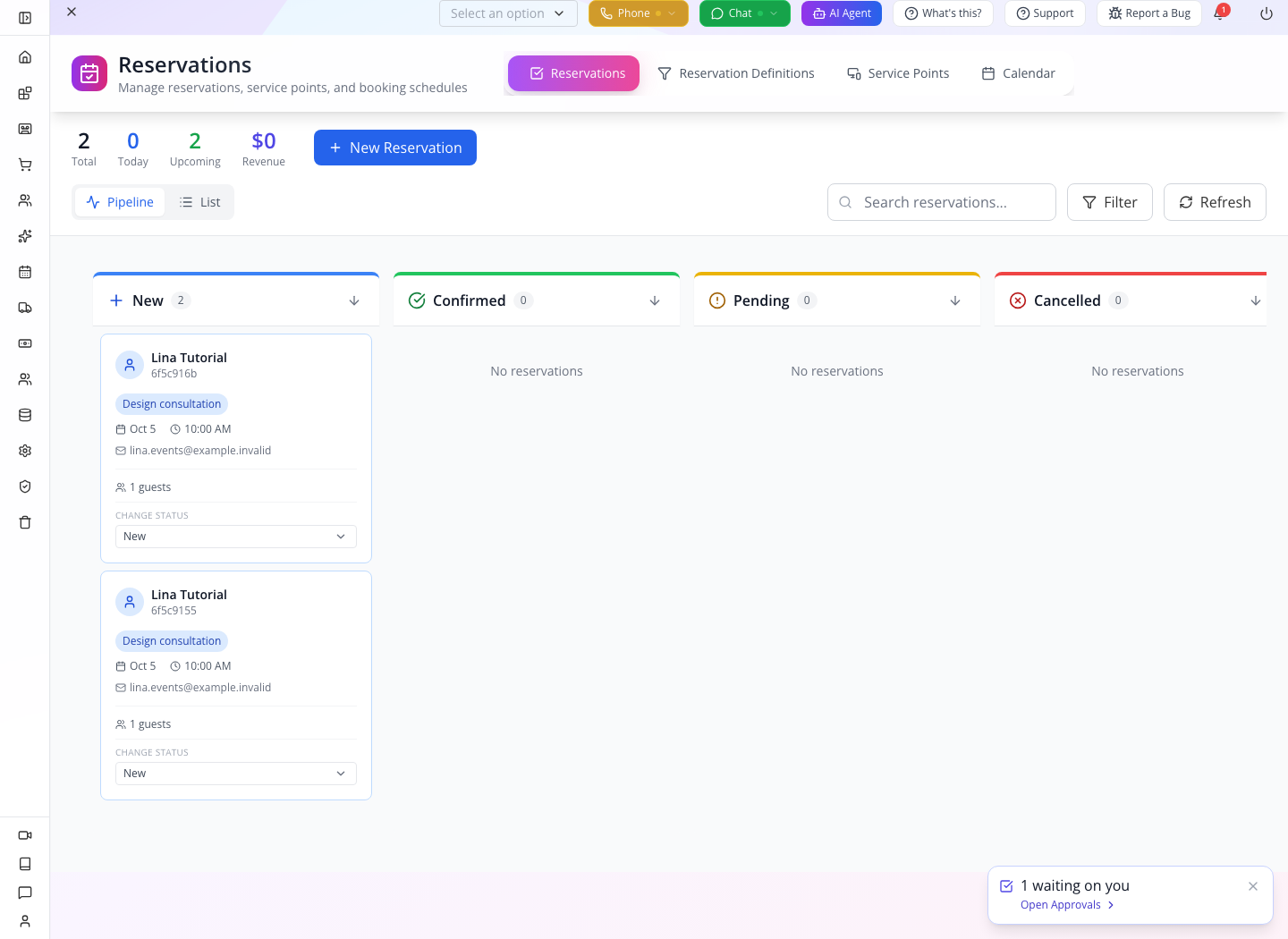
Disable duplicate submits while a request is running. After a timeout, first read the customer's recent bookings and reconcile the request. A production booking service needs a server-enforced idempotency key and an atomic availability check; a disabled button alone does not protect against retries from another device.
Try it: read back your booking in the customer list and staff board without sending another create request.
Check yourself: HTTP 201 means a new record was created. If two attempts return different IDs, you now have two bookings, even if their times match.
Part 3 — Build a client that handles real responses
1. Separate transport errors from empty data
This helper works with the response shapes exercised above. It also handles an empty response body instead of assuming every successful request contains JSON.
async function request(path, { method = 'GET', body, token } = {}) {
  const response = await fetch(`${API}${path}`, {
    method,
    headers: {
      orgid: ORG,
      'Content-Type': 'application/json',
      ...(token ? { Authorization: `Bearer ${token}` } : {})
    },
    ...(body === undefined ? {} : { body: JSON.stringify(body) })
  });
  const text = await response.text();
  let result = text;
  try { result = text ? JSON.parse(text) : null; } catch {}
  if (!response.ok) {
    const error = new Error(result?.error || result?.message || text || `HTTP ${response.status}`);
    error.status = response.status;
    error.code = result?.code;
    error.action = result?.action;
    throw error;
  }
  return result;
}
For the view, keep separate states: loading, loaded with records, loaded with no records, and failed. For a failed request, retain the error and a deliberate retry action; do not show “No bookings” as though the server successfully returned an empty list.
const result = await request('/client-data/reservations', { token: session.access });
if (!Array.isArray(result?.data)) throw new Error('Unexpected reservations response');
const bookings = result.data.map(record => ({
  id: record.sk,
  reference: record.data.name,
  service: record.data.service,
  startsAt: record.data.startTime,
  timezone: record.data.timezone,
  status: record.data.status
}));
For a small runnable check, download the local response-check page into an empty folder. In that folder run:
python3 -m http.server 4317 --bind 127.0.0.1Open http://127.0.0.1:4317/client.html. Fill Local API origin, Organization ID and the Customer access token from Lina's sign-in. Choose Load bookings. The page uses the helper above and keeps the token in memory without saving it to browser storage. Use only a customer token here.
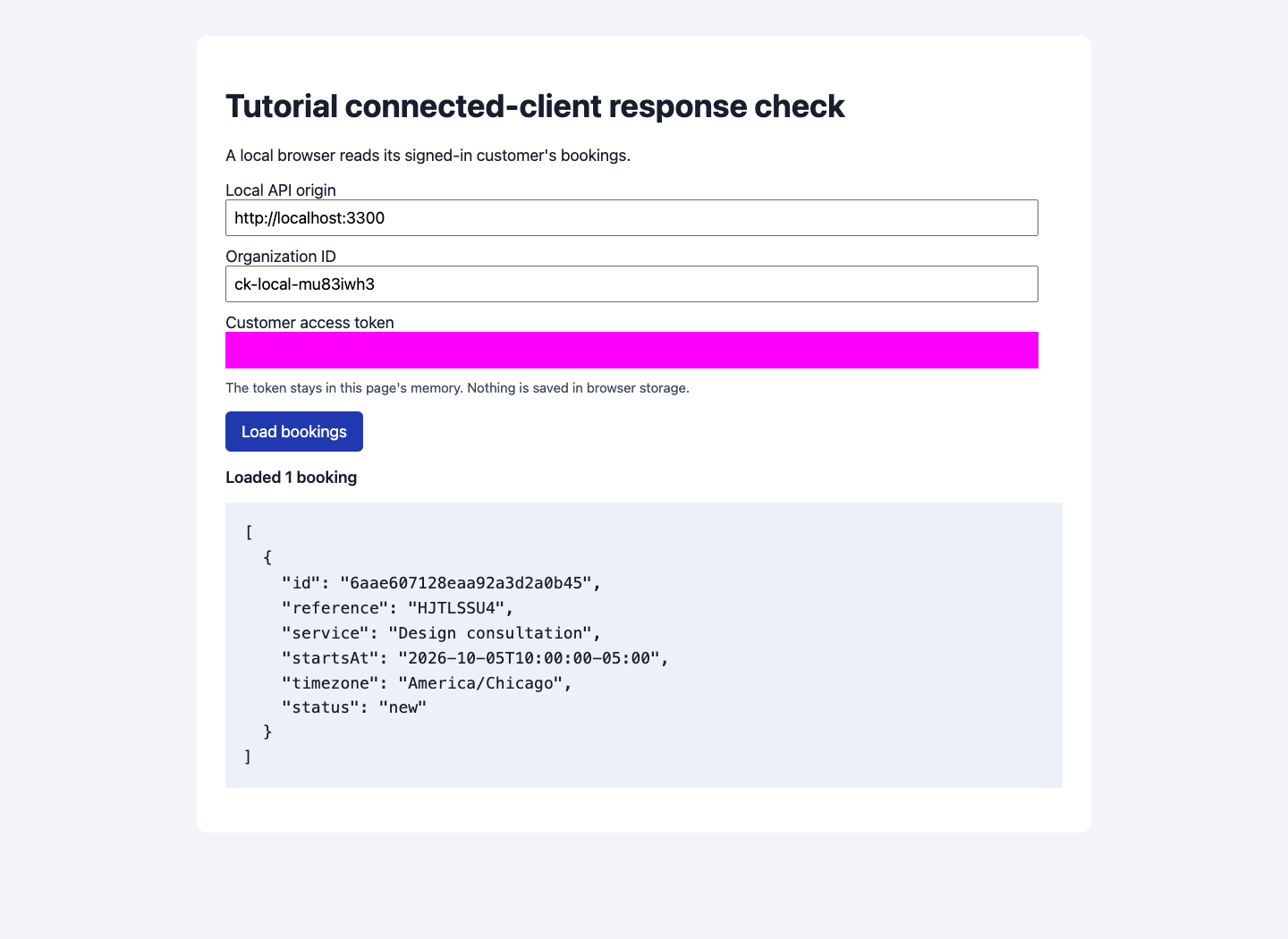
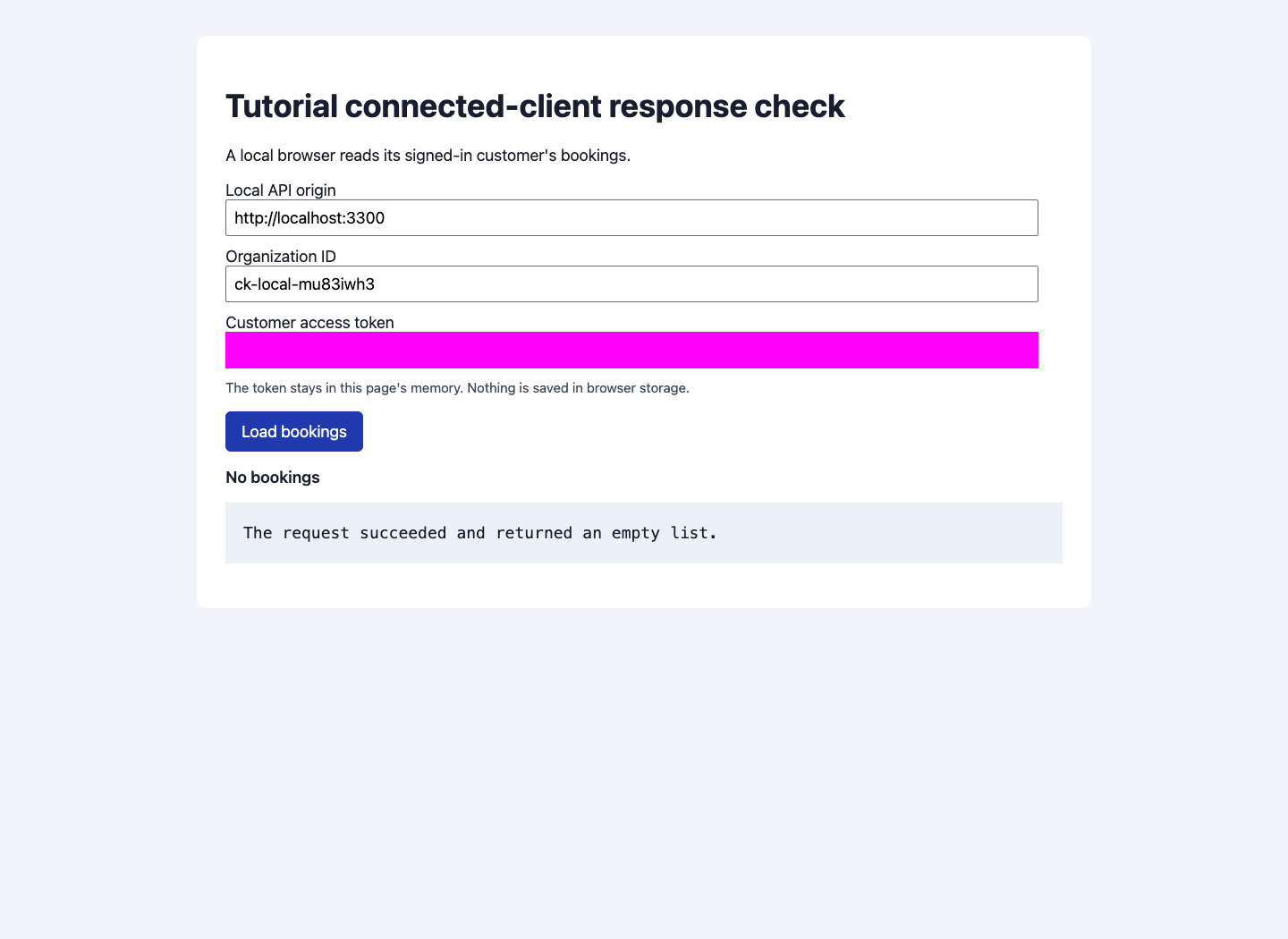
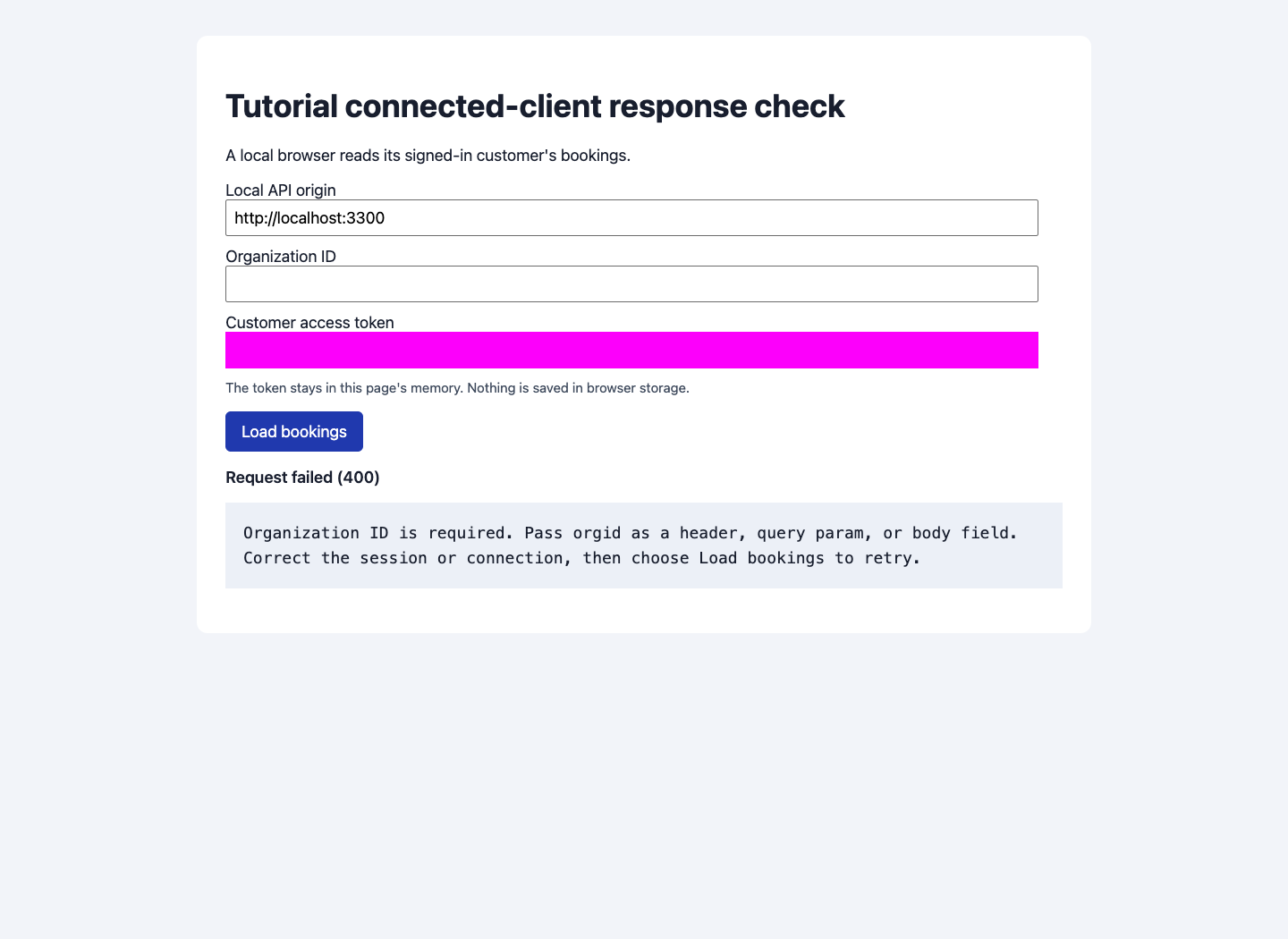
Replace the token with Kofi's and load again: No bookings means a successful empty list. Clear Organization ID and load again: Request failed (400) means an error, with a retry instruction. Restore the organization and Lina's token, then load again to recover the booking. Invalid credentials produce a separate 401 failure.
Close the page when finished and stop the temporary server with Ctrl+C. This is a local response-check page to adapt, not a production customer interface.
2. Refresh once, preserving the existing refresh value
POST /profile/customer/refresh accepts { "refresh_token": "<refresh-value>" } with orgid. A valid refresh returned HTTP 201 and a new access token. With a bare refresh JWT, this build omitted the returned refreshToken; retain the old value if no replacement arrives.
const renewed = await request('/profile/customer/refresh', {
  method: 'POST', body: { refresh_token: session.refresh }
});
if (!renewed?.token) throw new Error('Sign in again');
session.access = renewed.token;
session.refresh = renewed.refreshToken || session.refresh;
Allow one refresh and one retry of a failed read, then return to sign-in if it still fails. Do not loop indefinitely. Do not automatically repeat a booking POST after refreshing if its original outcome is uncertain.
The invalid-token response in this run also included action: "refresh_token"; the old claim that only expired tokens carry that action was incorrect. Expiry itself was not forced in this rehearsal.
3. Verify a profile edit rather than trusting its status
Send a flat patch containing the supported profile fields:
curl -sS -X PUT "$API/client-data/profile" \
  -H "orgid: $ORG" -H "Authorization: Bearer $CUSTOMER_TOKEN" \
  -H 'Content-Type: application/json' \
  --data '{"firstName":"Lina","lastName":"Tutorial Updated","phone":"+12025550147"}'
curl -sS "$API/client-data/profile" \
  -H "orgid: $ORG" -H "Authorization: Bearer $CUSTOMER_TOKEN"
Expect 200 from the update and a fresh GET containing data.lastName: "Tutorial Updated" and data.phone: "+12025550147". The checked local update returned a safe customer response; Kofi's fresh profile remained unchanged. Send profile fields only: do not include a record ID, organization, roles or password in this patch. The repair applies to this API, not every profile form in every app.
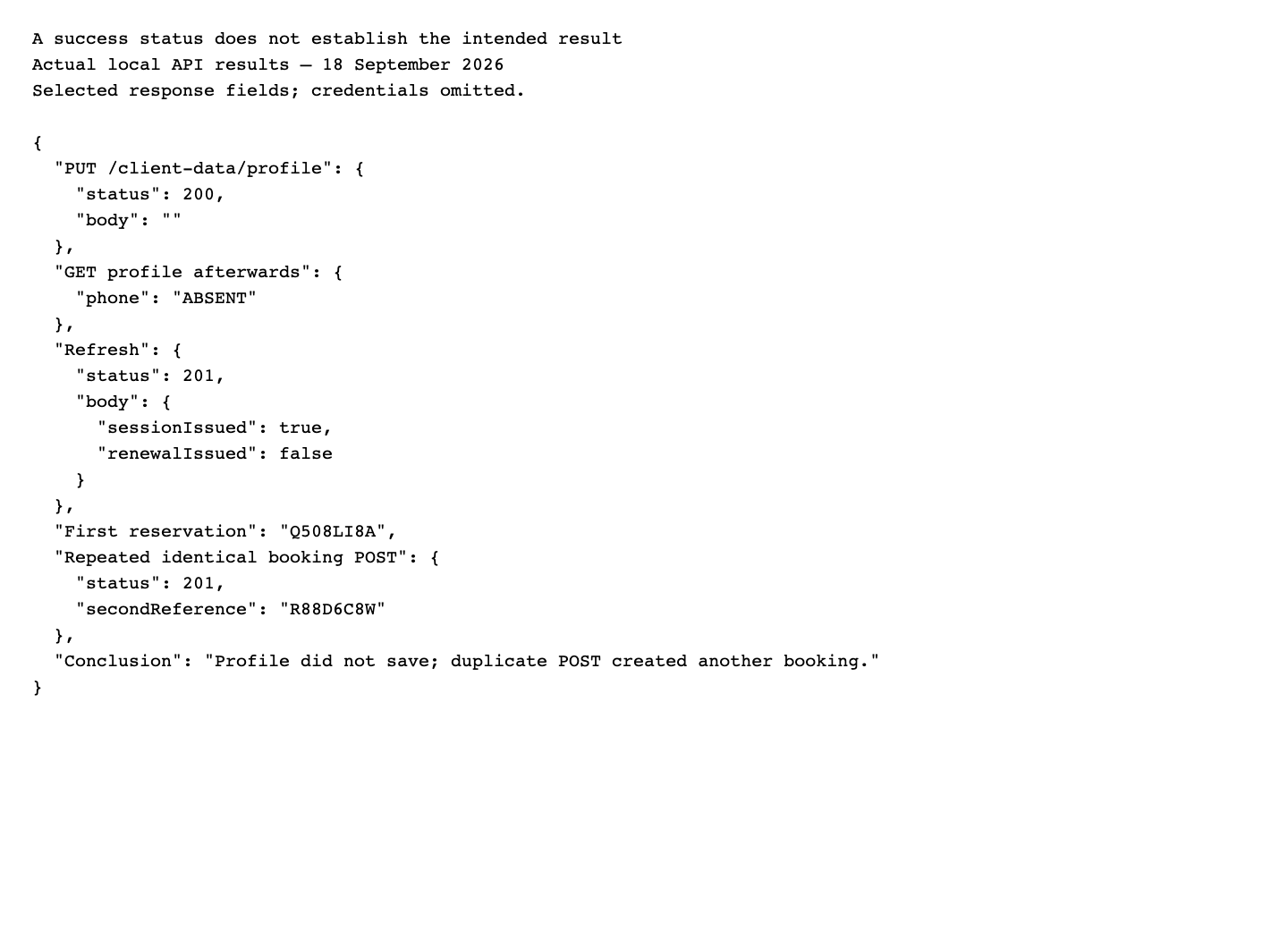
The earlier screenshot below records the old empty-body/no-persistence behavior. The 19 September local requests and fresh readback replace that result for this build. Still check persistence before showing “Profile saved” in your own client.
Try it: feed an empty reservations envelope and a structured 400 error into your rendering function. The user-facing states should differ.
Check yourself: why retain the old refresh value? The checked response issued a new access token without a replacement refresh value; overwriting it with undefined would break the next renewal.
Part 4 — Prove access and choose a deployment boundary
1. Test two customers, including direct record access
The fresh local check returned Lina's booking in her list and zero rows in Kofi's. Lina's single-record customer route returned 200; Kofi's request for that ID returned 404. The generic repository route returned 200 for Lina and 403 for Kofi, without booking data in the denial. Repeat these checks with your own records; a hidden menu or filtered list alone does not establish the boundary.

The image above records the earlier leak. The corrected results are preserved in the fresh local API transcript.
Repeat the read-only check with your own two customers and booking. The following commands reuse API, ORG, customer A’s CUSTOMER_TOKEN, customer B’s SECOND_CUSTOMER_TOKEN, and RESERVATION_ID from Part 2. Both customers must be controlled test identities in this organization. Do not use the staff bearer or x-client-authorization for either request.
First confirm that the two tokens still identify different customers. These are GET requests with no body:
curl -sS --write-out '\nHTTP %{http_code}\n' "$API/client-data/profile" \
  -H "orgid: $ORG" -H "Authorization: Bearer $CUSTOMER_TOKEN"
curl -sS --write-out '\nHTTP %{http_code}\n' "$API/client-data/profile" \
  -H "orgid: $ORG" -H "Authorization: Bearer $SECOND_CUSTOMER_TOKEN"
Both should return 200. Compare each record’s sk and data.email with your two test accounts; the IDs must differ. Customer A’s profile sk must equal the saved booking’s data.customer.id / data.customerId. If any identity does not match, stop before the cross-customer check.
Now read exactly the reservation your first customer created. The route is GET /repository/get/reservation/<reservation-sk>, with no request body. It returns a single record, not the /client-data/reservations list envelope:
# Control: customer A reads their own fictional booking.
curl -sS --write-out '\nHTTP %{http_code}\n' \
  "$API/repository/get/reservation/$RESERVATION_ID" \
  -H "orgid: $ORG" -H "Authorization: Bearer $CUSTOMER_TOKEN"

# Ownership check: customer B requests the same controlled booking ID.
curl -sS --write-out '\nHTTP %{http_code}\n' \
  "$API/repository/get/reservation/$RESERVATION_ID" \
-H "orgid: $ORG" -H "Authorization: Bearer $SECOND_CUSTOMER_TOKEN"| Request | Expected result verified against the running local API |
|---|---|
| A’s own-record control | HTTP 200, sk equal to RESERVATION_ID, and A’s saved customer ID/reference in data. This establishes that the route and test record exist. |
| B requesting A’s record | HTTP 403 with no booking/customer data in the response. HTTP 200 containing A’s record is a failed boundary check. The separate customer-specific single-reservation route uses 404 for inaccessible records; it is not the generic route exercised here. |
A 401 means the session must be corrected; it is not proof of ownership enforcement. A 404 for both requests does not establish a successful denial: first resolve the missing route/record or wrong environment. If your policy deliberately denies all customer use of generic repository routes, record that separate policy and prove the owner’s supported /client-data read instead; do not claim the owner-allowed generic-read test passed.
The fresh review used real customer sessions and a persisted local booking for both GETs. It did not query production records or infer an access result from a source-only test.
These commands cover direct reads only and do not create, update or delete records. Update, delete and attachment access are separate operations requiring disposable owned fixtures and an explicitly scoped procedure; this course does not supply or certify those mutation tests. A filtered list or the two GETs above cannot certify those other operations.
2. Call on behalf of a customer from your server
Use the STAFF_TOKEN established in Part 2 for this server-only example, with the customer token from Part 1. A separately registered application can also be a primary identity, but obtaining that credential is not part of this exercise:
curl -sS "$API/client-data/reservations" \
  -H "orgid: $ORG" \
  -H "Authorization: Bearer $STAFF_TOKEN" \
  -H "x-client-authorization: Bearer $CUSTOMER_TOKEN"
On the checked local API, this returned Lina’s one booking; substituting Kofi’s customer bearer returned zero. The single-record and generic ownership denials also held with a primary staff bearer and delegated Kofi identity.
The organization identifies the company, the primary bearer identifies the trusted server-side staff identity in this example, and the second bearer supplies the customer's identity. Derive that identity from your authenticated session; do not accept an arbitrary customer's email from a browser and treat it as authorization.
3. Understand the API-key screen
Open Account → API keys → Create New Key. The captured form has API Key Name, Description, Permissions, per-minute/hour/day Rate Limits, Expiration Date, Cancel and Save API Key.
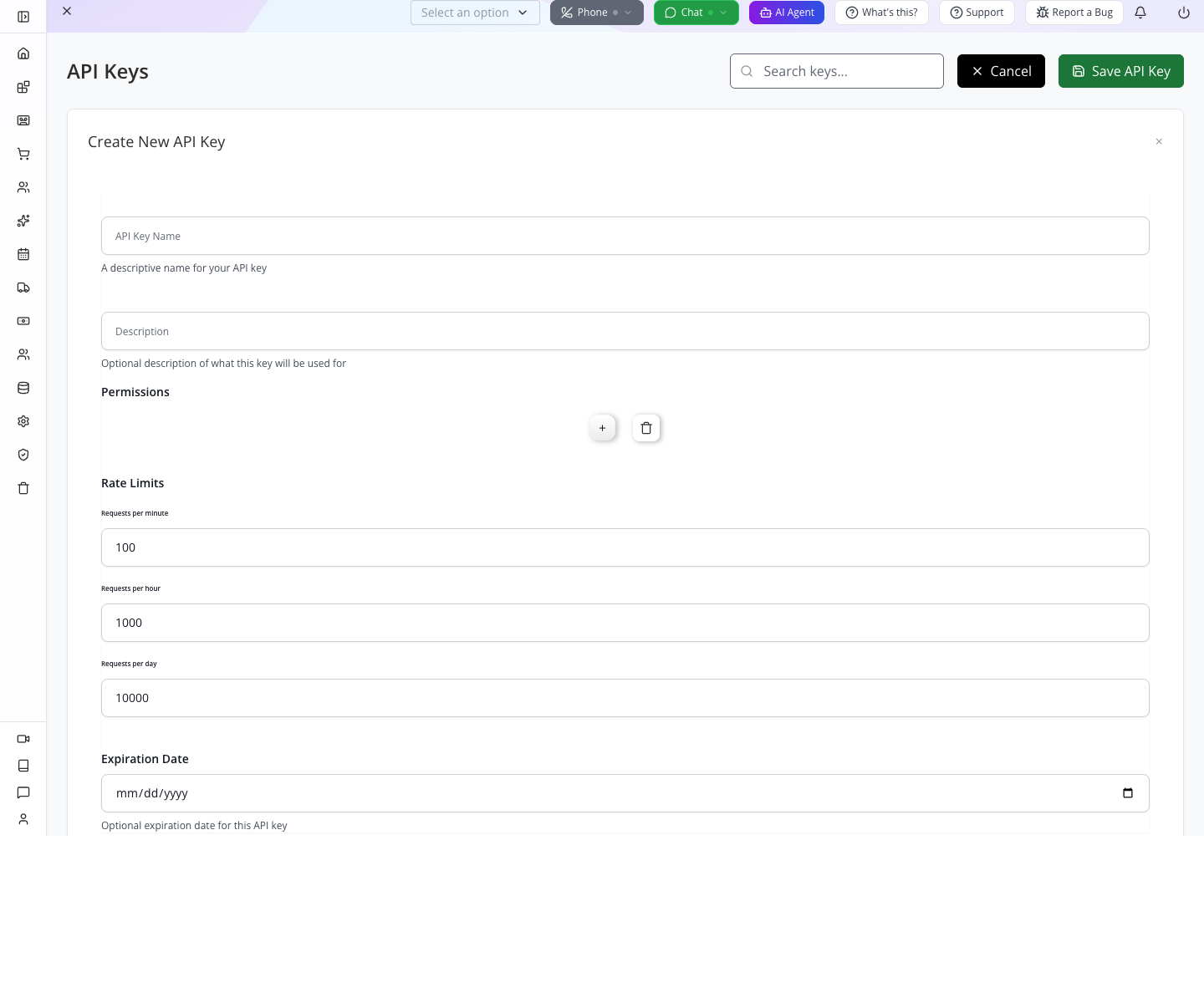
The Permissions section rendered without selectable scope entries in this run. No new key was created for the customer exercise. The screen's scope explanations should not be mistaken for verified enforcement: source review shows keys resolve to their creator's privileges. Use a dedicated appropriately restricted staff identity, store keys server-side, and test permissions at the API boundary. Do not put an owner key into a downloaded app or browser bundle.
4. Choose a client adapter without changing the API contract
The local JavaScript client source exposes createClient, auth.signIn and generic get calls. Its sign-in is the customer flow. The Flutter client separates customer and staff authentication; its updateFields() uses the partial-update route, while the inspected update() route does not match the server's generic update route. These are source notes, not a package-install or SDK execution result from this rehearsal.
Start with the HTTP calls above, then check your installed SDK version against them. Hosted Configuration → Scripts, the window.appmint runtime, chat embedding and Vibe-generated interfaces are alternate presentation paths. They do not remove the need for response handling, correct identity or access testing. Follow Customer chat and Vibe Studio for those user-facing workflows.
The local response-check page at http://127.0.0.1:4317 successfully called http://localhost:3300: its preflight returned 204 and allowed the organization/content-type/authorization headers; actual GET responses included Access-Control-Allow-Origin: *. The browser loaded records, an empty list and structured errors. For browser deployment, test your actual origin. Production CORS uses ALLOWED_ORIGINS when configured; the current source otherwise reflects origins. A successful curl request does not establish browser access. Check the preflight and response headers rather than assuming localhost is always blocked or always allowed.
Try it: repeat the working read through your server with both identities and compare the returned customer with a direct customer-session read.
Check yourself: does a staff key's name “read only” restrict it? A descriptive name is not an access policy. Verify the creator's permissions and the server's enforcement.
If something goes wrong
| Symptom | First check | Next action |
|---|---|---|
| Host does not resolve | API origin | Use the checked service address or your operator's configured origin. |
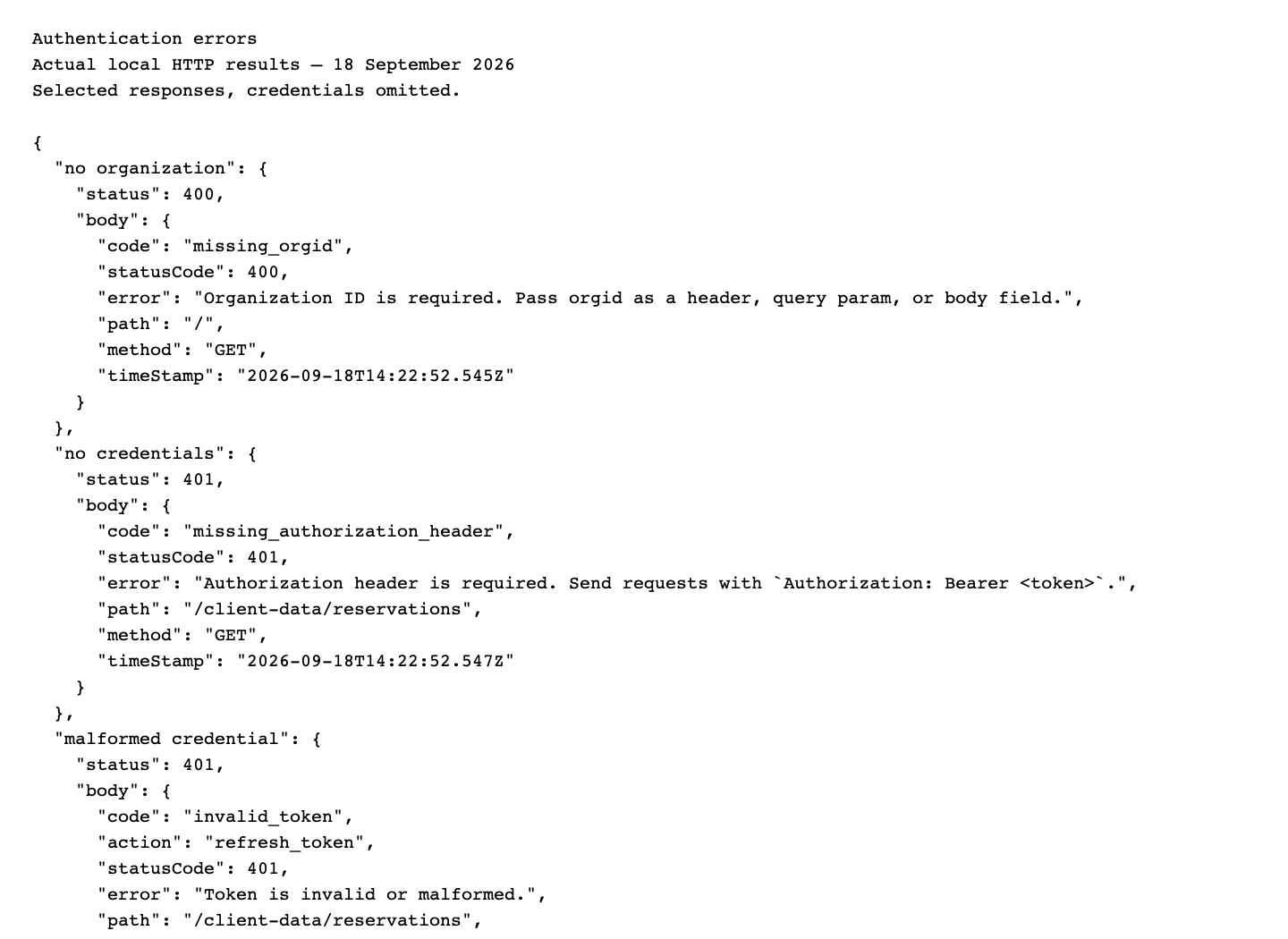
400 missing_orgid | Company header | Send orgid consistently. |
400 bad password | Customer route and credentials | Correct the customer sign-in details; staff and customer routes differ. |
401 missing_authorization_header | Bearer header | Add the access credential with Bearer and a space. |
401 invalid_token | Valid session from this environment | Renew once if appropriate, otherwise sign in again. |
| Staff dashboard returns customer-not-found | Identity type | Use customer sign-in or both application/customer headers. |
| List exists but UI is empty | Response envelope | Read response.data, then each record's data. |
| Dashboard upcoming count is zero | Actual booking status | Read the reservation list; new does not match aggregate upcoming. |
| Single booking route returns empty or 404 for its owner | Correct environment, session and reservation ID? | The checked local route returns one record for its owner; verify your deployed build and compare the filtered list. |
| Profile says saved but readback is unchanged | Flat supported fields and current API build | Repeat GET; the checked repair persists firstName/lastName/phone. Do not treat a success status alone as persistence. |
| Duplicate booking | Repeated POST or uncertain timeout | Reconcile IDs; add server idempotency before automated retries. |
| Repository create POST returns 404 | HTTP method | Use the demonstrated PUT route. |
| Another customer can read a generic record | Server access policy | Fix ownership enforcement and retest; menu changes do not repair it. |
What happened behind the scenes
Implementation and evidence for developers
Read appengine/src/client-account/client-account.controller.ts and client-account.service.ts for the /client-data routes, record wrappers, dashboard's literal status filter and the repaired profile-update validation/persistence. crm/reservations.service.ts validates the definition/service, constructs the reservation, links the customer, saves new and creates notifications/reminders. Its single-record ownership lookup is now repaired and verified through the running API. The historical duplicate-create behavior is distinct from that read repair.
Authentication and refresh are in users/users.controller.ts, users/users.service.ts, middlewares/current-user.middleware.ts and users/auth/jwt.auth.guard.ts. Refresh currently splits the provided refresh string when returning a replacement value. Generic routes and permissions are in repositories/repository.controller.ts; a customer list and a generic record read are separate paths.
API-key handling is in users/apikey.controller.ts, its service and the identity middleware. Client adapters are in appmint-client/appmint_js_client/src/index.ts and appmint_flutter_client/lib/src/repository.dart. CORS configuration is in appengine/src/main.ts.
Evidence: initial reads, definition, booking request, first create, two-customer readback, two-identity reads and repeated create, capture ledger.
Where next
- Connect a supplier API — server-side provider calls.
- Build an AI business assistant — tool discovery and controlled execution.
- Vibe Studio — a generated interface connected to these data contracts.
Historical evidence, 18 September: normal staff/customer sign-in, profile/dashboard/orders/reservations reads, free definition and booking creation, Studio board readback, two-account list/direct-record checks, two-identity headers, wrong-password/missing-header/malformed-token errors, valid refresh, nonpersisting profile update and repeated-create behavior were exercised on the local training organization. Public production health was checked; production business-data access, forced expiry, SDK execution, API-key creation and public-client deployment were not performed. No new webpage was built. Video production guide.
Fresh learner verification, 19 September 2026: used controlled local organization ck-local-mu83iwh3, newly created Lina/Kofi customers and one new booking. Actual local API and browser checks passed for signup/sign-in, profile/list/orders/dashboard, definition creation and reuse, reservation creation/list/single read, Studio reload, customer profile persistence, refresh, direct and delegated ownership denials, API-key form inspection, and browser loaded/empty/400/401/retry states. Customer signup and booking mail reached an organization-scoped loopback SMTP catcher; raw mail and credentials remain private. No production access, external provider send, second booking POST, API-key creation, SDK package execution, forced expiry, reservation mutation/file security test or public deployment was performed. Verification report and evidence.