
 One path, two methods, different responsibilities. We will follow the update through its controller and service, then compare the response with the saved data.
Who: developers and platform maintainers with source access. Time: 75–90 minutes. Level: developer, with advanced operations branches. Product: AppEngine, Studio Manager and Vibe development environments. Checked: 21 September 2026; local AppEngine 0.132.0 through the Cedar training renderer and API r11. Production deployment is not required for this local course.
What you will have at the end
You will know how to turn “it says saved, but nothing changed” into a precise diagnosis. You will locate a live route, reproduce it with a training identity, follow the source, read the affected record, and produce a release checklist that tests the intended behavior. You will also compare health signals, inspect queue and usage evidence, and distinguish an environment record from a working deployment.
This is a maintainer course. Business owners do not need to install a backend to use Appmint or BusinessMade. The practical investigation uses an existing local training server; the isolated-development and release sections describe the next engineering work, without claiming a patch or deployment was performed.
What you need
- The AppEngine and WebsiteMint source checkouts and permission to inspect the environment you are diagnosing.
- A training organization and its own staff/customer accounts from Connect a client to AppEngine.
- Your API base URL, terminal and browser. Our verified learner server is port 3311; the source default is
SERVER_PORT=3000. Match the actual running process. - For the environment section, your own Vibe project. The Cedar local rehearsal intentionally has no
dev_environmentfixture, so its 404 branch is documented instead of borrowing another organisation’s project.
Production AppEngine answered at https://appengine.appmint.io. The alternative api.appmint.io did not resolve during this check. Local accounts and production accounts belong to different installations: a local signup is not automatically a production login.
The story and route
Lina tries to update her phone number through the customer portal. The direct API can persist the value, but an older server-side proxy adds an internal query field and returns 400. We will reproduce the boundary, repair the proxy, and prove the saved value with a fresh read.
User action → request method/path → identity and organization
                                → controller → service → saved record
                                                        ↓
                         readback → diagnosis → isolated fix → release checks
Keep a short incident note as you work: environment, time, actor type, request method/path, status, intended result, observed result and record identifier. Include sanitized response fields. Passwords, bearer tokens and credential-bearing invitation URLs are not diagnostic attachments.
Part 1 — Trace a real success response that saved nothing
1. Open the API reference served by this installation
Open /documentation on your API base URL. The checked page is a custom AppEngine API index, with a search field, sections, credential controls and curl/JavaScript/Python examples. It reported 2,751 endpoints in 144 sections at capture time; counts change with the build.
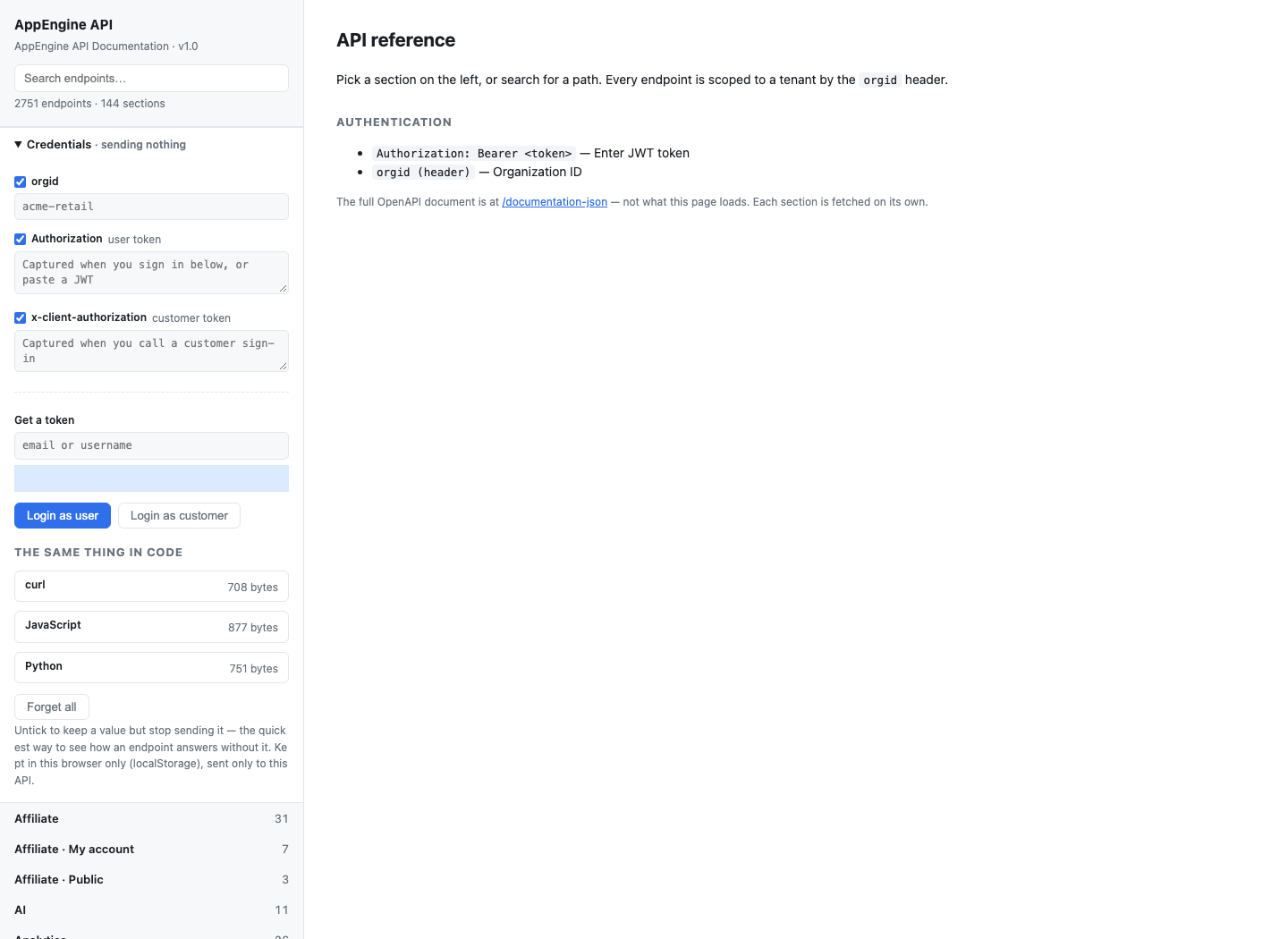
Keep Credentials · sending nothing while browsing the reference. The page separates Authorization — user token from x-client-authorization — customer token and provides Login as user, Login as customer and Forget all. Enter credentials only for a request you intend to execute, then clear them when finished on a shared machine.
Gotcha: the documentation describes available routes and declared responses. It cannot establish that a service actually saves the requested field. This example's declared “Profile successfully updated” response is precisely what we are testing.
2. Find the exact method and path
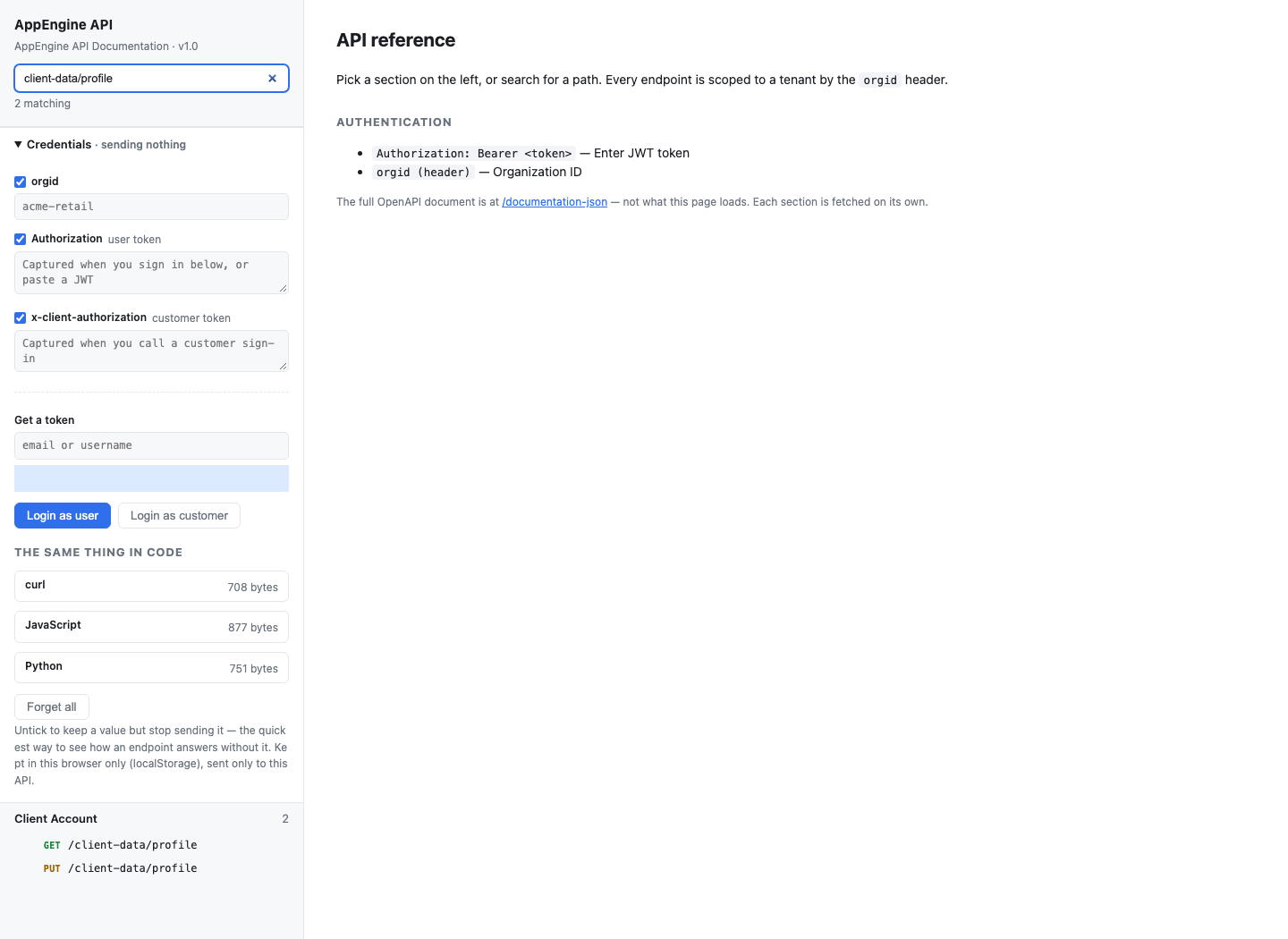
In Search endpoints…, enter client-data/profile. The live result contains GET /client-data/profile and PUT /client-data/profile. GET reads; PUT is intended to update. Do not treat them as interchangeable because their path is the same.
For a terminal investigation:
curl -sS "$API/documentation/search?q=client-data/profile"
curl -sS --get "$API/documentation/endpoint" \
  --data-urlencode 'method=PUT' \
  --data-urlencode 'path=/client-data/profile' \
  --data-urlencode 'format=json'
The second request returned 200 with method, path, tag, operation and components. Omitting format=json returns Markdown. /documentation-json and /openapi.json expose the full specification; /llms.txt and /documentation.md provide entry points for source-aware tools.
The search response in our local installation generated absolute detail links on proxy.appmint.io. Keep your intended API origin and use the returned path when investigating the local build. Accidentally moving between installations makes comparisons unreliable.
3. Establish a before value with the correct identity
Authenticate through normal customer sign-in using your own training customer. Use that customer bearer as CUSTOMER_TOKEN and your organization ID as ORG:
curl -sS "$API/client-data/profile" \
  -H "orgid: $ORG" -H "Authorization: Bearer $CUSTOMER_TOKEN"
The returned profile is a record envelope: business fields are in data. Record the current phone value, including whether it is absent. Our fixture had no phone. A staff token is not a substitute for the customer session; the tested staff dashboard request returned a customer-not-found error.
4. Update one harmless field and prove the readback
Use the same customer session for both requests. The supported body is a flat JSON object; do not wrap it in data and do not add transport metadata to it:
curl -sS -i -X PUT "$API/client-data/profile" \
  -H "orgid: $ORG" -H "Authorization: Bearer $CUSTOMER_TOKEN" \
  -H 'Content-Type: application/json' \
  --data '{"phone":"+12025550123"}'

curl -sS "$API/client-data/profile" \
  -H "orgid: $ORG" -H "Authorization: Bearer $CUSTOMER_TOKEN"
The local rehearsal returned 200 from the PUT and the fresh GET returned data.phone: "+12025550123" with phoneVerified: false. The retained sanitized transcript is profile-before-update-after.json. A phone change deliberately clears the verification flag; it does not claim that the number has been verified.
If you call the route through a WebsiteMint/base-app proxy, use the patched client or a current build. The proxy must not append its internal clientQuery property to the customer body. Before this repair, that leaked transport field caused a strict profile patch to return 400 even though direct AppEngine accepted the same flat body. The fix is recorded in the application repair report.
An HTTP client must handle an empty body on other PUT routes before attempting JSON parsing. For this repaired profile route, assert both the HTTP status and the fresh GET value.
5. Follow controller to service and provider
From the projects directory, search the source:
rg -n 'updateProfile|updateClientProfile|updateOwnCustomerProfile|updatePartial' /Users/imzee/projects/appengine/src/client-account /Users/imzee/projects/appengine/src/repositoriesclient-account.controller.ts binds PUT /client-data/profile and delegates to ClientAccountService.updateClientProfile. That service calls updateOwnCustomerProfile, which validates the authenticated customer, restricts the patch to firstName, lastName and phone, checks the organisation-scoped record, writes dotted fields through RepositoryService.updatePartial, reloads the record and compares every requested value. This readback is the boundary assertion that the old no-op implementation lacked.
The shared base-app client is a separate boundary: it forwards the JSON body to AppEngine and may carry query metadata internally. Keep that metadata out of strict domain payloads. Test both direct API and proxy paths when a UI reports success.
6. Write the useful diagnosis
Use this structure for the internal bug record:
Before the repair, the local base-app proxy appended
clientQueryto the flat customer patch, soPUT /client-data/profilereturned 400 through the UI. Direct AppEngine accepted the same flat body. After the shared client fix, the renderer path returns 200 and a fresh GET confirms the phone value. The customer service also enforces identity, allowed fields and readback.
Include the timestamp, installation, actor type, method/path, status, sanitized record identifier and readback value. Passwords, bearer tokens, magic-link URLs and full customer exports are never diagnostic attachments.
Try it: send an unsupported field, then send a valid phone update. The first must fail without changing the record; the second must return a value you can prove with a fresh GET.
Check yourself: would changing the success toast fix a proxy that adds an invalid field? No. Fix the boundary and assert persistence.
Part 2 — Read the platform's operating signals
1. Compare health components
Use the same API origin and ORG organisation ID established in Part 1. Read both endpoints; the production monitoring endpoint requires the organisation header:
curl -sS "$API/health"
curl -sS "$API/monitoring/health" -H "orgid: $ORG"
The screenshot below is the earlier local rehearsal, not a promised result for your environment. The later production check returned missing_orgid when the monitoring header was omitted; the command above includes it. Compare the responses from your own origin and organisation rather than expecting the screenshot's component states.
Our local /health response reported isHealthy: true, degraded: false, and memory, database, KeyDB and S3 up. The monitoring response's headline was healthy, but its Redis component was unhealthy with connected: false.
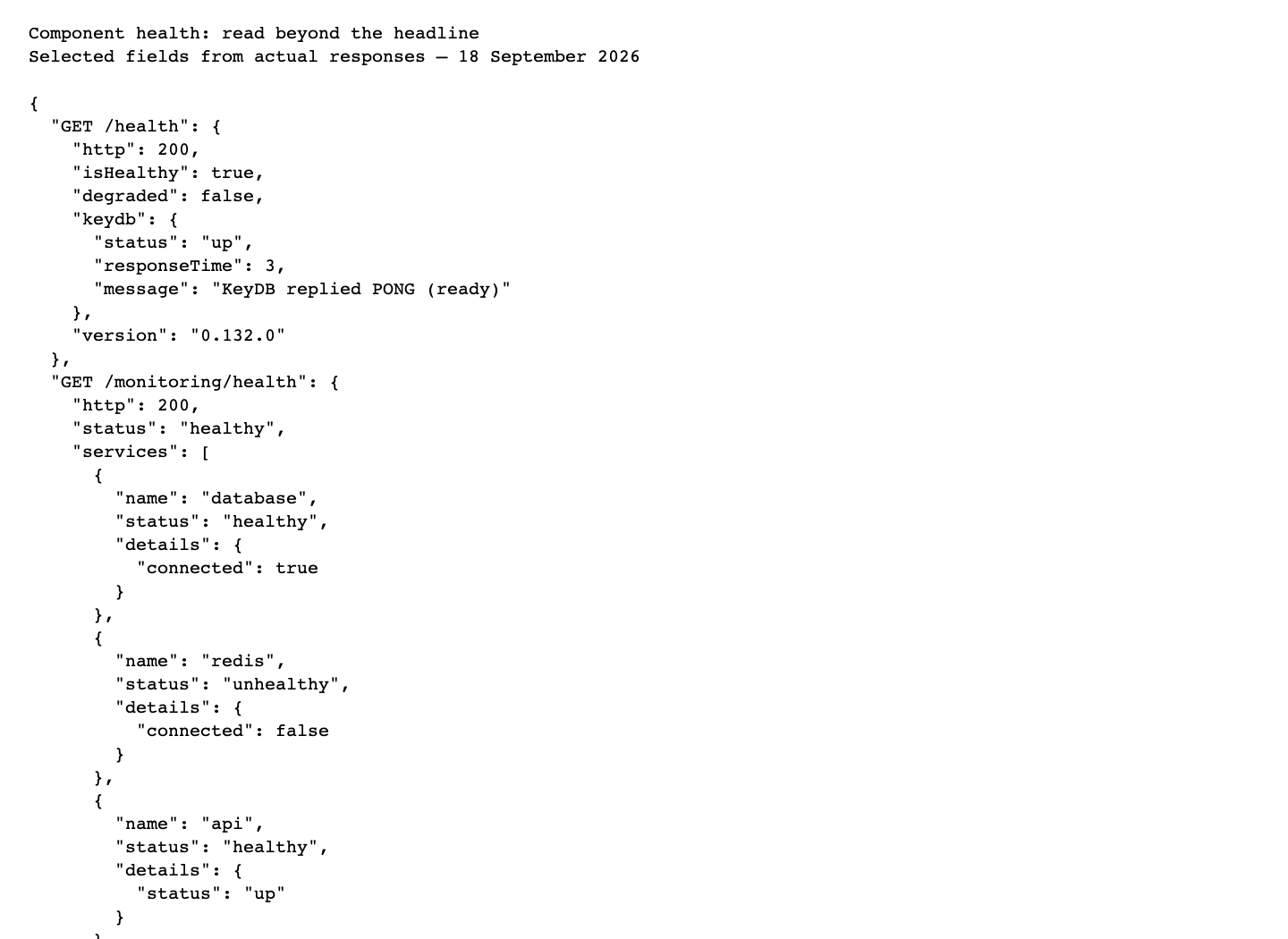
Do not flatten these into “all systems healthy.” Record the disagreement and investigate which client/connection each probe checks. The responses alone do not tell you whether a particular customer action worked. Follow the action's request and record too.
The current rate limiter defaults to 10,000 requests per 15 minutes, overridable by RATE_LIMIT_MAX. It skips OPTIONS and /monitoring/health; /health is not exempt. A probe should evaluate component results as well as HTTP status. A 200 headline with a failing component should remain visible to operators.
2. Inspect queues without changing shared work
curl -sS "$API/monitoring/queues" -H "orgid: $ORG"The practiced request returned queue aggregates without a bearer. This is an operational exposure to account for, not evidence of role-based protection. Shared counts may include other organizations. Keep investigation exports restricted to your own fixture when reading detailed job endpoints.
Use Background jobs for the completed record → delayed job → worker → target rehearsal. That course includes a failed three-attempt job, repair and a later successful run. Empty queue depth is not sufficient: successful jobs can be removed, failed jobs can remain, and the Studio Runs tab did not show the activity available through the API.
Do not pause a shared queue or remove synchronization ticks to make a training screenshot. Those actions affect work beyond one tutorial record.
3. Read your organization's usage
curl -sS "$API/usage/balance" \
  -H "orgid: $ORG" -H "Authorization: Bearer $STAFF_TOKEN"
curl -sS "$API/usage/stats" \
  -H "orgid: $ORG" -H "Authorization: Bearer $STAFF_TOKEN"
Both returned 200 for the training organization. The balance response included free usage balance information; stats were paginated and indicated another page. Read pagination before reporting totals. Usage telemetry does not introduce a paid prerequisite for Appmint or its mobile apps.
A usage entry names an operation. It does not certify the recipient received a message, a phone call connected or a charge settled. Verify each business outcome in its own system.
4. Separate a Vibe environment record from its deployment
Use the production account and organisation that own the project. ENV is the Dev Environment Name entered when creating the project in the Vibe course, not a database sk, organisation ID or display title. Use the existing project's name from your own creation record; do not create a duplicate to obtain it.
Assign that exact name locally before the requests below:
read -r -p 'Your existing Dev Environment Name: ' ENV
: "${ENV:?Enter the existing environment name before continuing}"
These examples run in Bash. The environment read looks up dev_environment.data.name within the organisation header. Check its returned data.name matches your chosen name before interpreting container status. If the record read returns 404, verify the project name, owning organisation and API origin; do not proceed with another person's example name.
curl -sS "$API/dev-env/get/$ENV" \
  -H "orgid: $ORG" -H "Authorization: Bearer $STAFF_TOKEN"
curl -sS "$API/dev-env/$ENV/status" \
  -H "orgid: $ORG" -H "Authorization: Bearer $STAFF_TOKEN"
In the Cedar local organisation used for this review, a read-only POST /repository/find/dev_environment returned total: 0; both the example record and status lookups therefore returned 404. That is a missing local fixture, not evidence that an arbitrary environment exists. Stop at this branch, record the exact organisation/name/API origin, and continue the lifecycle exercise only after the learner has created or selected an environment in Vibe. A record row and a running container remain different facts.
The earlier project transcript reported a missing SpinForge partner key. A fresh get-spinforge read now returned 200; the historical message alone no longer establishes the present server configuration. That response can contain connection details, so the public evidence retains only status and field names.
Follow the Vibe course for the current editor and preview captures. An environment row, connected file editor, local static preview and public deployment each need their own check.
Try it: create a four-line incident summary: API health, component warning, affected request, persisted result. Avoid the single sentence “the server is up, so it must be the browser.”
Part 3 — Prepare an isolated fix and release
1. Match the checkout to the running build
Record the version from /health and the source revision you will change. Confirm the server's actual port and API origin. Do not restart a shared process while another person is testing against it.
For a separate development instance, inspect package.json, src/config/config.ts and src/config/app.config.ts. The checked configuration names include MONGODB_CONN or MongoDB host/port credentials, Redis host/port credentials, and SERVER_PORT. Use a dedicated training database and queue configuration. Never copy a production secret file into a recording or commit.
The checkout's scripts include npm run watch for Nest watch mode, npm run build for the server and copied UI resources, and npm run start:prod for the built entry point. npm run lint uses --fix, so it changes files; it is not a read-only diagnostic command. Use the project's existing dependency lockfile and environment instructions when installing. A port change alone does not isolate a shared database or Redis queue.
2. Define behavior before changing the service
For the profile issue, the acceptance cases are concrete:
| Case | Required result |
|---|---|
| Customer changes an allowed field | Validated value persisted and returned by fresh GET |
| Customer sends another customer's identifier | Server refuses access; identity comes from the authenticated session |
| Unsupported field or malformed phone | Clear validation error; unrelated fields retained |
| Expired/missing authentication | Authentication error; no write |
| Empty update | Explicit documented behavior; no false claim that a field changed |
| Persistence failure | Error surfaced; no success toast or fabricated updated record |
Use two training customers for ownership checks. The connected-client rehearsal found a separate generic repository read that exposed one fictional customer's reservation to another customer's bearer. Fixing the profile no-op does not fix that route. Customer isolation must be enforced across the server surface before a public customer app is certified.
3. Test the actual boundary
Add a focused service/integration test for the update and a request-level ownership test. Re-run the exact before → PUT → after sequence against the isolated build, then reload the consuming client. Check that invalid input does not erase unrelated fields and that the second customer cannot update the first.
For the older group-editor issue, investigate the sequence separately: the UI saves the group, then attempts a generic user save rejected with User should be updated using user api. A persisted membership plus an error toast is a partial success, not the profile no-op. Keep the repository's identity protections; repair the caller's use of the appropriate user operation.
4. Release with a known recovery point
Prepare the reviewed change, test results, expected migrations, configuration changes and a known previous artifact/revision. Deploy only through the team's authorized release workflow. Run the same readback on the target installation using a training account and inspect errors/queue effects.
Environment APIs expose lifecycle actions such as start, stop, restart and rebuild. They are mutations, not diagnostics. A rebuild of current files is not automatically a rollback. Recovery requires the intended previous source/artifact and any compatible data/configuration state. This course did not rebuild, stop or deploy the shared production project.
5. Know which extension belongs where
- Gateway integrations implement
IntegrationProvider, register exports and supply schemas/operations. Follow the supplier course. - Studio navigation lives in WebsiteMint's
packages/ui/src/ui/sidebars/links.ts; BusinessMade uses its own sidebar and route registry. A hidden menu does not enforce server permissions. - System Operations is gated by system-organization UI conditions. Queue actions have their own server guards. Inspect both before granting an operator role.
- Stowbo is a gated extension with storage/host/booking workflows; this training organization did not exercise it. Do not turn a directory listing into a claimed completed customer journey.
- Social automation spans CRM, integration providers and synchronization. The empty
src/socialdirectory does not mean social features are absent. - Hub agent distribution and device registration belong in Device Hub, including actual download links and pairing checks.
If something goes wrong
| Symptom | First check | Next action |
|---|---|---|
| 200, field unchanged | Fresh GET and service body | Diagnose missing/incorrect persistence; do not retry indefinitely |
400 missing_orgid | Organization header | Supply the company ID for this installation |
| 401 or session expired | Actor type and normal sign-in | Renew the intended identity; avoid token sharing |
| Browser fails while terminal works | Actual origin, preflight and response | Inspect CORS and rate-limit response; production origin list is conditional |
| Healthy headline, unhealthy Redis component | Both health response bodies | Investigate probe/client disagreement |
| Search link opens another installation | Generated absolute URL | Keep your selected base URL and use the route path |
| Record exists, container status 404 | Environment versus hosting state | Keep project; investigate missing container/domain mapping |
| Group membership saved with red toast | Both sequential requests | Repair the inappropriate user save, preserving the successful group write |
| Stats list looks incomplete | Pagination | Read remaining pages before totals |
What happened behind the scenes
Source and evidence for maintainers
Profile path: appengine/src/client-account/client-account.controller.ts and client-account.service.ts. Runtime reference: documentation/documentation.controller.ts and its UI. Boot, rate limiting, CORS and port: main.ts. Configuration: config/config.ts, config/app.config.ts; read names and validation, not secret values.
Monitoring: monitoring/monitoring.controller.ts. Usage: usage/usage.controller.ts. Environment lifecycle: site/dev-environment.controller.ts; hosting: site/container-management.service.ts. Group sequence: WebsiteMint components/user-management/group-editor.tsx and AppEngine repositories/repository.crud.service.ts. Sidebar gating: WebsiteMint ui/sidebars/links.ts.
Evidence: health, monitoring health, queue aggregates, profile route detail, search, anonymous identity, usage balance, usage stats, environment readback, and capture ledger.
Where next
Background jobs follows queued work to a business result. Connected clients supplies the authentication, booking and ownership examples behind this investigation.
Evidence: runtime documentation, endpoint detail, anonymous identity, health, monitoring, usage and own production environment reads completed. Profile no-op and customer-boundary checks reuse the actual connected-client rehearsal. Source path inspected. No source patch, fresh backend installation, deployment, rollback, root-account operation or Stowbo workflow is claimed. Video production guide.